PostgreSQL has been the most popular open source database since 2020 and matured over decades. Many organization have already started migrating their databases to PostgreSQL because of the open source nature, flexibility and the customization that we can do in PostgreSQL with extensions.
For one of our customers, we had several production PostgreSQL instances running on version 13, spread across multiple AWS regions. Each was a few hundred GBs in size along with read replicas. As you might know that AWS RDS standard support for PostgreSQL 13 ended in February 2026 and AWS charges additional fees for extended support. From March 2026, every Postgres v13 instance will incur a surcharge of 6x on the standard pricing. To get bug fixes and security patches you are forced to pay premium or upgrade to a newer version. Also, there is a risk that after sometime, the older versions will not be supported at all.
This is where we decided to upgrade to Postgres v18. Like every other business, we wanted to have a minimum downtime and minimum code changes. To achieve this, we explored and identified that AWS RDS blue/green deployment is the best way to do it. In this blog post, we will share our experience of upgrading and learnings.
Why Postgres v18, and Why Now
PostgreSQL v18 is a major release in the recent years and for good reasons. It has a lot of improvements and new features that we wanted to take advantage of. To take advantage, we skipped four versions and upgraded to v18.
Here are some of the key features that we are excited about:
Async I/O
Native asynchronous I/O delivers 2-3X throughput on sequential scans, bitmap heap scans, and VACUUM. No application changes needed.
Better observability
pg_stat_io breaks cache hits and reads latency down per backend. pg_stat_statements query identifiers now survive restarts.
Planner and index improvements
B-tree skip scans make composite indexes useful for queries that don't filter on the leading column. Better join ordering. Better partition pruning.
Runway
Postgres v18 is supported until February 2031.
Why we used AWS RDS Blue/Green deployment strategy?
Major-version upgrades on RDS used to mean two bad options. Run pg_upgrade in place, accept a real maintenance window, and pray nothing goes wrong because rollback is painful. Or do a dump-and-restore, and accept hours of downtime. Neither works for a 24/7 system with users in three timezones.
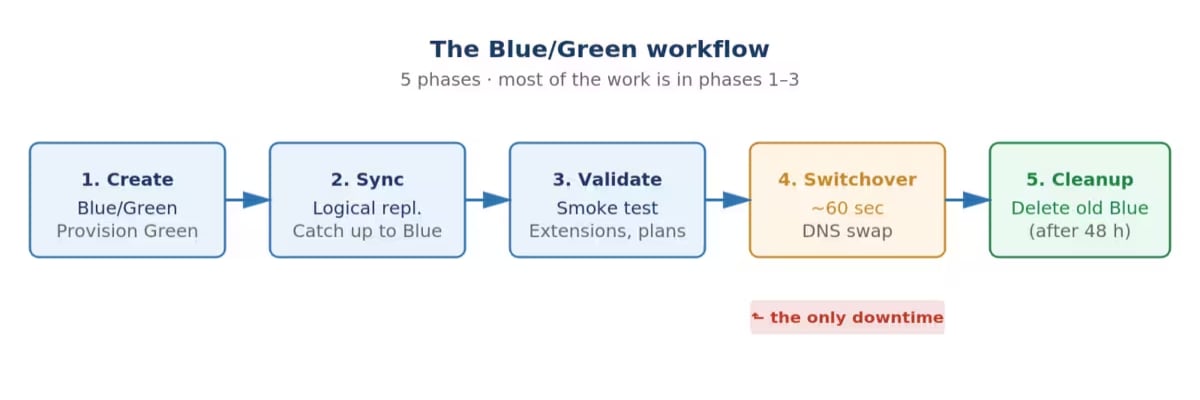
Blue/Green changes the problem entirely. AWS spins up a copy of your database on the new version (Green) while the original (Blue) keeps serving traffic. PostgreSQL logical replication keeps them in sync. When you're ready, AWS swaps the DNS endpoints in under a minute, and your app reconnects to the upgraded database. The connection string never changes.
Planning the upgrade
The most important thing to do to get confidence in our process is to rehearse it. So we worked on well written runbook and tested it in our non-production clusters until we refined it to the point where we were confident it would work in production.
The upgrade process
- Take a manual snapshot of production
- Restore it as an isolated RDS instance in the same account and VPC
- Attach a custom parameter group with the right logical replication settings
- Create a Blue/Green deployment targeting Postgres v18
- Wait for sync, run smoke tests against the Green endpoint, and switch over
- once confident and ready drop the old instance
How to Rollback? Blue/Green has automatic rollback if the switchover fails its own health checks; AWS just keeps you on Blue. But once the switchover succeeds and your application has written even a single row to the new database, going back means losing those writes. That's a real decision with real data-loss implications. The rehearsal is when you decide what would actually trigger one. You don't want to be making that call for the first time during an incident.
Learnings
- Configuration Issues: Parameter group settings that don't meet Blue/Green prerequisites. Tune these to match the workload, and remember some of them require a reboot:
max_wal_sendersmax_replication_slotsmax_logical_replication_workersmax_worker_processesrds.logical_replicationrds.blue_green_replication_type
- Schema Issues: Two specific things will fail Blue/Green creation with errors:
-
Tables without primary keys: Logical replication uses the primary key to identify rows. Without one, updates and deletes won't replicate, and the whole stream can stall. If adding a real PK needs a design review you don't have time for,
REPLICA IDENTITY FULLis a reasonable workaround. It tells PostgreSQL to send the entire old row instead of just the key. WAL volume goes up a bit but upgrade will work. -
Extensions Incompatibility: A version of an extension that works on Postgres v13 may not even exist on Postgres v18. RDS upgrades the binary during Blue/Green but leaves your extensions where they were. If an extension version exists on Postgres v13 but not Postgres v18, deployment creation fails with an unhelpful error. Audit installed extensions, update anything that's behind, then update them again on Green after the switchover.
- Logical replication wasn't enabled: Blue/Green needs it on the source, but stock RDS parameter groups don't have it.
Fix: Custom parameter group, set the logical replication and worker process parameters, reboot. Do this well before the change window as these settings need a restart.
- DDL executions during the sync broke replication
Logical replication doesn't carry schema changes. Someone added a column to a table on Blue while Green was syncing, and the next write to that table broke the replication stream. There's no clean recovery - we had to tear down the Blue/Green and start over. It cost us more than an hour of re-provisioning.
Fix: Hard-freeze all schema changes from the moment Blue/Green is created until switchover finishes. Tell every team with write access. Same rule for long-running transactions, since they hold back replication and can fail the switchover itself.
- Smoke testing Green before switching
The Green instance has its own endpoint while Blue is still alive. Use it. We checked the version, confirmed replication lag was zero, ran our top queries from pg_stat_statements against Green and compared plans against Blue, verified extensions, and spot-checked row counts on the largest tables. If anything fails here, you abort and Blue keeps serving. That's the whole point of the design, and it's worth actually exercising.
The Switchover
Once you click Switch Over, AWS handles the rest. It briefly write-blocks Blue so Green can catch up to the final LSN. It verifies they're in sync. It swaps DNS endpoints, flips Green to read-write, and puts Blue into read-only as a safety net. If any health check or timeout fails along the way, AWS rolls everything back automatically and leaves you on Blue.
The best part is what doesn't happen: your application's connection string doesn't change. AWS reuses the original endpoint name, so existing connections drop, the connection pool reconnects, and the next query lands on the upgraded database. We redeployed the app during the window to force all connections to reset cleanly, but it wasn't strictly necessary. The whole switchover finished in under a minute. Users didn't notice.
What we improved with the upgrade
A major-version upgrade is a rare moment when you have permission to change almost everything. We treated it as more than a version bump and rolled in every hygiene fix we'd been putting off.
- Postgres v18 features: Native asynchronous I/O is the headline change - 2-3x faster on sequential scans, bitmap heap scans, and
VACUUM. We also picked up B-tree skip scans, the richerpg_stat_ioview for per-backend cache and latency analysis, planner statistics that survivepg_upgrade, native UUIDv7, and OAuth 2.0 authentication.
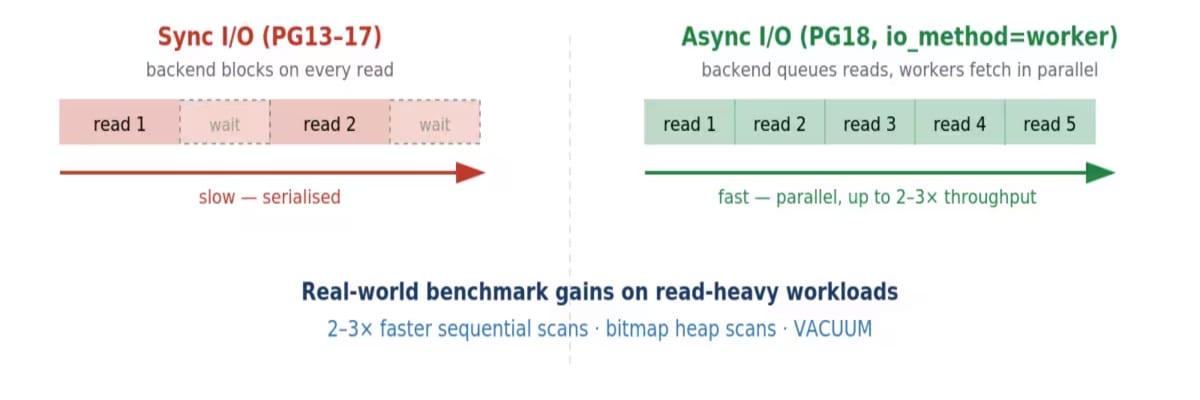
PostgreSQL 18's async I/O is the biggest raw-performance change in years. Worker-based I/O lets backends queue multiple reads in parallel instead of blocking on each one.
- A fresh parameter group: We didn't carry the Postgres v13 group forward. Started from
default.postgres18and only set the values we actually needed: async I/O on,effective_io_concurrencyraised,work_memincreased, checkpoint and autovacuum behaviour tuned. Everything that was a workaround for an old-version quirk got dropped. - Extensions brought current: Every extension in every database got
ALTER EXTENSION... UPDATEafter the switchover. RDS won't do this for you, and stale versions just accumulate quietly until something breaks. - Monitoring turned on: Performance Insights and Enhanced Monitoring went on as part of the Green configuration. Both are cheap. Neither needs a restart if you enable them upfront. You'll need both for the tuning work that comes next.
- Graviton instance class: Moved from Intel-based
db.m5to Graviton3-baseddb.m7g. AWS's own RDS benchmarks show about 30% better throughput, 27% better price-performance over the previous generation, and 50% more memory bandwidth. PostgreSQL is memory-bandwidth-bound on hot queries, so this actually matters.
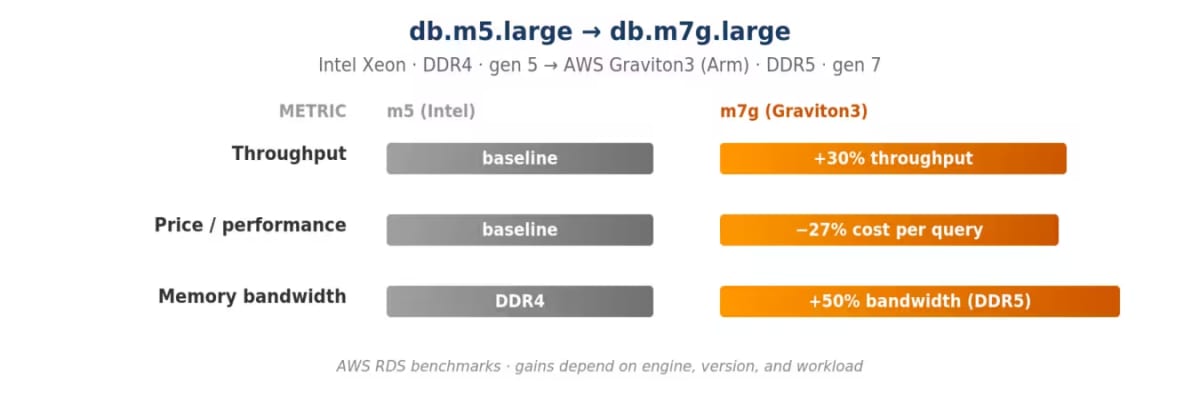
AWS's own RDS benchmarking for PostgreSQL. Graviton3 (m7g) is the first RDS instance family with DDR5 memory, giving 50% more memory bandwidth - meaningful for memory-bandwidth-bound workloads like PostgreSQL.
- gp3 storage with tuned IOPS and throughput: gp3 separates capacity from performance - you size storage for what you need to store and set IOPS and throughput independently. Much better fit for a database than gp2's coupled model. You don't need Blue/Green to do this, but doing it in the same window meant we only had to validate performance once.
Post-Switchover Performance Tuning
The switchover itself is anticlimactic. Database is up, app reconnects, users don't notice. There's a temptation to close the ticket and move on, Don't. The first few days/week on the new version are when you have the richest performance data you'll ever have.
Postgres v18's pg_stat_io, pg_stat_statements, and pg_stat_user_tables together surface common opportunities:
- Async I/O isn't always on: On some instances RDS defaults
io_methodtosync, which silently disables Postgres v18's biggest feature. Check every instance after switchover. Flipping it to the worker is the highest-ROI change you'll make. - One query usually dominates database time: Sort
pg_stat_statementsby total execution time and you'll almost always find one or two queries eating most of the budget. The fix often isn't in the database - it's a polling loop or an unfiltered join in the application that needs to be redesigned. Hand the evidence back to the app team. - Cache hit ratios below 97% point at a missing index: The
pg_stat_iobreaks cache behaviour down per table, so you can spot the one table thrashing the buffer pool. The fix is usually a partial index that matches the actual query pattern. - Unused indexes are pure cost: They take disk, buffer cache, and slow down every write. Find them with
pg_stat_user_indexes WHERE idx_scan = 0. Wait a few weeks to be sure, confirm with the app team, then drop them withDROP INDEX CONCURRENTLY. - Bloated tables and stale autovacuum settings: Blue/Green resets statistics - every table starts with
Last Analyzed = todayand zero dead tuples. Default autovacuum thresholds only kick in at 10% dead, which on a large table is a lot of bloat. Run manualVACUUM ANALYZEon the biggest tables, then tune per-table autovacuum settings to trigger earlier. - Checkpoint and work_mem tuning: Long checkpoint write times mean
max_wal_sizeandcheckpoint_completion_targetneed raising. Lots of temp file generation inpg_stat_statementsmeanswork_memis too small. Both are parameter group changes that apply without a restart.
Final Thoughts
With any upgrade, there is always a risk of failure or a miss, so keep a few things in mind:
- Rehearse on a real restored snapshot to find production surprises in an environment you can throw away.
- Freeze schema changes during the sync window. DDL during sync breaks replication with no clean recovery.
- Budget DBA time for two weeks after switchover to use the new telemetry to fix tuning opportunities.
PostgreSQL releases a major version annually. Skipping these updates creates "technical debt" as missed versions pile on deprecated parameters and orphaned extensions. Old versions just become more expensive to maintain.
If you are looking for help with migration, please book a meeting with us to discuss your needs.