PostgreSQL major upgrades in Kubernetes involve much more than changing the database version. We often hear stories that running databases on Kubernetes is hard. One can argue on this topic and whether we should run it or not, Chris has penned down his thoughts earlier. In short, we do recommend stable projects like CloudNativePG to create PostgreSQL clusters on Kubernetes. The project has evolved a lot in the last few years. Due to its recent acceptance as a CNCF Sandbox project, it has got more traction and support from various companies including us.
If you have not heard about CloudNativePG (CNPG) so far, here is a short introduction. It is an open-source operator designed to manage PostgreSQL workloads on Kubernetes cluster. It fosters cloud-neutrality through seamless deployment in private, public, hybrid, and multi-cloud environments via its distributed topology feature. We have seen many customers migrating off from cloud managed services like AWS RDS to save cost or to make multi-cloud possible. The self-hosted architecture allows you to be cloud agnostic and at the same time gives you freedom to build a custom PostgreSQL for you from hundreds of extensions available. For example, if you are looking to run TimescaleDB on PostgreSQL, today you can’t do it on AWS RDS, however this is possible on CNPG running on EKS. Talking about reliability, we have seen our customers run 100s of databases using CNPG just like AWS RDS.
This article talks about a very important aspect of CloudNativePG management that is upgrades. Often upgrading a database is hard because of variability over time. No two systems are the same. Here we are showing methods on how to do database upgrade reliability with minimal down time.
Why upgrade to latest CNPG Operator and PostgreSQL version
Before going further, we would like to highlight that CNPG is relatively a young project unlike PostgreSQL in the CNCF ecosystem and it is evolving rapidly. In past few versions, there were many operations bugs that caused issues. CNPG developers are working hard to make it bug free and hence we also recommend testing the new version thoroughly. If you need help, don’t hesitate to engage us.
Upgrading to CloudNativePG 1.29 provides significant infrastructure improvements, specifically by enabling in-place instance manager updates that eliminate rolling restarts and connection drops during maintenance, alongside a more robust, native backup configuration.
PostgreSQL 18 introduces a native async_io subsystem, which speeds up sequential scans and data-heavy queries by fetching data from disk concurrently instead of waiting on blocking system calls. The update also enhances logical replication stability, optimizes GIN indexes, and accelerates JSONB querying for improved performance.
Understanding the CloudNativePG upgrade approaches
CloudNativePG supports multiple approaches for PostgreSQL major version upgrades, each with different trade-offs around downtime, complexity, and rollback safety. To understand the operational impact in real environments, we tested both supported upgrade paths: traditional in-place pg_upgrade and logical replication-based migration. The goal was to compare how each method behaves during backups, failovers, replication sync, and production-style cutovers.
We tested both supported upgrade approaches.
| Feature | In-Place pg_upgrade | Logical Replication |
|---|---|---|
| Upgrade Method | Upgrade existing PostgreSQL cluster in place | Create new PostgreSQL18 cluster and replicate data from PostgreSQL 17 |
| Downtime | Required | Near-zero |
| Operational Complexity | Simple | Moderate to High |
| Setup Effort | Minimal | More setup required |
| Rollback Strategy | Restore from backup | Switch traffic back to old cluster |
| Database Copy | Reuses existing data files | Data replicated to new cluster |
| Application Traffic During Upgrade | Stopped during upgrade | Continues on PG17 during sync |
| Cutover Process | Restart upgraded cluster | Switch traffic after replication lag reaches zero |
| Performance | Very fast for small databases | Depends on replication speed |
| Scalability with Large Databases | Downtime increases with size | Better suited for large databases |
| Risk Level | Higher during upgrade window | Safer because source cluster remains intact |
| Schema Requirement | Existing schema upgraded automatically | Schema must exist beforehand |
| Common Challenges | Backup/restore dependency | Replication edge cases |
| Best Use Case | Small to medium databases with acceptable downtime | Production workloads requiring minimal downtime |
| Observed Test Result | ~2 minutes downtime for small databases | Near-zero downtime during cutover |
For production systems with strict uptime requirements, logical replication-based migration is the perfect solution.
How to upgrade the CNPG Operator and Database
To showcase, we have created a scenario from one of our environments. We wanted to understand CNPG behaviour before touching anything in production. This demo is created using a Kind cluster with a realistic-sized database and runs through every operation: install, backup, operator upgrade, major version upgrade, logical replication, monitoring, and a full disaster recovery cycle.
The test database had 32 million rows across 6 tables - customers, orders, order_items, products, inventory, and an audit_log, with JSONB columns, GIN indexes, and foreign keys. Big enough to expose real problems.
Here's the high-level flow we have tested:
Install CNPG operator 1.25 with a PostgreSQL17 cluster (primary + standby) Deploy MinIO as S3-compatible backup storage Load test data, take a backup, validate it Upgrade the CNPG operator from 1.25 to 1.29 Create PostgreSQL cluster with version 18 Setup logical replication between PostgreSQL17 and PostgreSQL18 and monitor Setup CNPG monitoring Destroy everything and restore from backup (DR test)
Architecture Overview of our setup
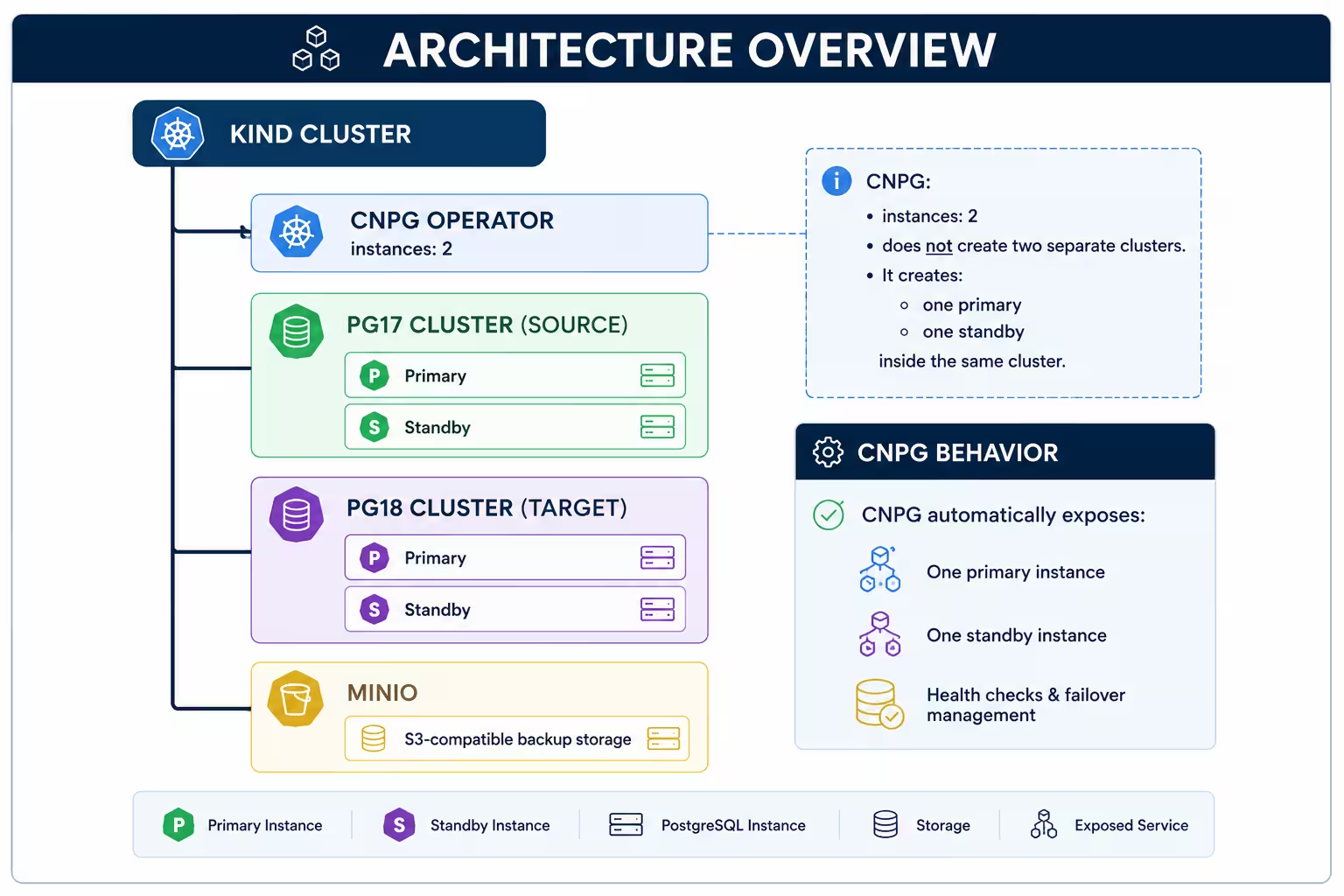
Architecture for the CNPG PostgreSQL upgrade demo environment.
Installation and setting up a test cluster
To showcase the upgrade (production like state), here we are installing the 1.25 version.
# install CNPG 1.25 operator in kind cluster

kubectl apply --server-side -f \
https://raw.githubusercontent.com/cloudnative-pg/cloudnative-pg/release-1.25/releases/cnpg-1.25.0.yaml
bash
Now let's create a small 2 node Postgres cluster (Primary + 1 standby, PostgreSQL 17)
apiVersion: postgresql.cnpg.io/v1
kind: Cluster
metadata:
  name: <server-name>           # <server-name> = say pg_lab
spec:
  instances: 2                  # 1.(Creates pods: pg-lab-1, pg-lab-2)
  imageName: ghcr.io/cloudnative-pg/postgresql:17.4
  storage:
    size: 1Gi
  postgresql:
    parameters:
      wal_level: "logical"      # 2. Used for replication
      ...
yaml
Note that instances: 2 creates one primary and one standby in the SAME cluster, not two clusters. CNPG auto-creates three services per cluster:
<name>-rw→ always points to primary (use for writes)<name>-ro→ points to standbys (use for read scaling)<name>-r→ points to all instances
To check who is primary/standby:
kubectl get pods -l cnpg.io/cluster=<server-name> -L role
kubectl exec -it <pod-name> -- psql -U postgres -c "SELECT pg_is_in_recovery();"
# f = primary, t = standby
bash
Deploying MinIO for local S3 storage
# Create namespace and authentication secret
kubectl create ns <name-space>
kubectl create secret generic minio-creds \
  --namespace <name-space> \
  --from-literal=MINIO_ROOT_USER=<minio-user> \
  --from-literal=MINIO_ROOT_PASSWORD=YOUR_PASSWORD
bash
# minio-setup.yaml
apiVersion: apps/v1
kind: Deployment
metadata:
name: minio
namespace: <name-space>
spec:
replicas: 1
template:
spec:
containers:
- name: <container-name>
image: quay.io/minio/minio:latest
args: ['server', '/data', '--console-address', ':9001']
envFrom: [{ secretRef: { name: minio-creds } }]
# ... [ports, volumeMounts, and emptyDir volumes here] ...
---
apiVersion: v1
kind: Service
metadata:
name: minio
namespace: <name-space>
spec:
ports:
- port: 9000
name: api
# ... [console port and selector info here] ...
yamlProvision your target backup bucket
kubectl run minio-mc --namespace <name-space> --rm -it --restart=Never \
  --image=quay.io/minio/mc:latest --command -- \
  sh -c "mc alias set local http://minio.minio-upgrade.svc.cluster.local:9000 <minio-user> <password> && mc mb local/<backup-folder>"
bash
Load test data, take backup, and validate it
Insert data in PostgreSQL17 (primarily via the ~rw service) and CloudNativePG. It instantly replicates it to the standby pods automatically. Take the backup and validate it.
# ecom-db-backup.yaml
apiVersion: postgresql.cnpg.io/v1
kind: Backup
metadata:
  name: <backup-name>
spec:
  cluster:
    name: <server-name>
# List backup files in S3
kubectl run minio-mc --namespace <name-space> --rm -it --restart=Never \
  --image=quay.io/minio/mc:latest --command -- \
  sh -c "mc alias set local http://minio.minio-upgrade.svc.cluster.local:9000 <minio-user> YOUR_PASSWORD && mc ls --recursive local/<backup-name>/<server-name>/base/"
bash
Always set the serverName explicitly in your configuration, as even a tiny mismatch completely breaks the restoration path in MinIO and triggers a no target backup found error.
Upgrading CNPG operator from 1.25 to 1.29
Upgrading the CNPG operator is not very complicated but do read the release notes of each release and also be aware of certain settings in your cluster specification about automatic in-place upgrade. Each cluster pod runs two containers, one is the bootstrap container that is upgraded during the CRD update. The other one is postgreSQL instance container (actual database application container).
During the operator upgrade, the new container detects older instance binaries running in existing database pods. By default this triggers a rolling restart of PostgreSQL instances that can cause an automatic switchover where a standby is promoted and the primary restarts resulting in a brief connection interruption.
Hence to reduce disruption, enable in-place instance manager updates before upgrading the operator.
apiVersion: v1
kind: ConfigMap
metadata:
  name: cnpg-controller-manager-config
  namespace: <name-space>
data:
  ENABLE_INSTANCE_MANAGER_INPLACE_UPDATES: 'true'
yaml
Run this in correct order:
- apply the configmap
kubectl apply -f cnpg-inplace-config.yaml
bash- restart the CURRENT operator so it loads the config
kubectl rollout restart deployment cnpg-controller-manager -n cnpg-system
kubectl wait --namespace <name-space> \
  --for=condition=ready pod -l app.kubernetes.io/name=cloudnative-pg --timeout=120s
bash- verify the config is loaded (look for inplace in the logs)
kubectl logs -n cnpg-system deploy/cnpg-controller-manager | grep -i inplace
bash- NOW upgrade the operator
kubectl apply --server-side -f \
https://raw.githubusercontent.com/cloudnative-pg/cloudnative-pg/release-1.29/releases/cnpg-1.29.0.yaml
bash- Verify:
kubectl get deployment cnpg-controller-manager -n <name-space> \
  -o jsonpath='{.spec.template.spec.containers[0].image}' && echo
kubectl get cluster <server-name>
kubectl get pods -l cnpg.io/cluster=<pod-name> -L role
bash
Create PostgreSQL cluster with version 18
For near-zero downtime migration, we are setting up a parallel PostgreSQL cluster with the latest version. Next we will set up logical replication between source and target cluster.
Let's create a PostgreSQL 18 cluster.
apiVersion: postgresql.cnpg.io/v1
kind: Cluster
metadata:
  name: pg-lab
spec:
  instances: 2
  imageName: ghcr.io/cloudnative-pg/postgresql:18.3
  storage:
    #.... Storage configuration here ...
yaml
Here you have two clusters running side by side. PostgreSQL17 (source) with all your data, PostgreSQL18 (target) empty. The source keeps serving traffic.
Setup logical replication and monitor data sync
First, check which pod is primary on the target:
kubectl get pods -l cnpg.io/cluster=<pod-name> -L role
bash
Logical replication can replicate row data continuously but it does not copy DDL objects like tables/indexes, therefore the schema must be dumped from the source and restored on the target separately.
Dump schema from source and apply to target using pg_dump
kubectl exec -i <source-pod> -- pg_dump -U postgres -s > source_ddl.sql
kubectl exec -i <target-pod> -- psql -U postgres < source_ddl.sql
bash
Create the publication on the source
Kubectl exec -i <source-pod> -- psql -U postgre "CREATE PUBLICATION <pub_name> FOR ALL TABLES;"
bash
Create the subscription on the target
kubectl exec -i <target-pod> -- psql -U postgre "CREATE SUBSCRIPTION <sub_name> connection 'host=<source-pod> port=5432 dbname=postgres user=postgres password=<password>' PUBLICATION <pub_name>;"
bash
Monitor sync progress: (Sync states: r=ready , d=compying , i=initializing)
kubectl exec -i <target-pod> –- psql -U postgres -c "SELECT srrelid::regclass AS table_name, srsubstate AS state FROM pg_subscription_rel ORDER BY table_name;"
bash
Wait until all tables shows 'r' syncing state
Cutover to PostgreSQL 18 once all data is replicated
verify zero lag:
kubectl exec -i <target-pod> -- psql -U postgres -c "
SELECT subname, received_lsn, latest_end_lsn, received_lsn = latest_end_lsn AS fully_synced FROM pg_stat_subscription;"
bash
Should show fully_synced = t.
Test real-time replication: Insert some rows on source Database and immediately check the same on target database.
Do the actual cutover :
# disable subscription
kubectl exec -i <target-pod> -- psql -U postgres -c "ALTER SUBSCRIPTION <sub_name> DISABLE;"


# detach from replication slot
kubectl exec -i <target-pod> -- psql -U postgres -c "ALTER SUBSCRIPTION <sub_name> SET (slot_name = NONE);"

# drop subscription
kubectl exec -i <target-pod> -- psql -U postgres -c "DROP SUBSCRIPTION <sub_name>;"

# drop publication on source
kubectl exec -i <source-pod> -- psql -U postgres -c "DROP PUBLICATION <pub_name>;"

# clean up orphaned replication slot on source
kubectl exec -i <source-pod> -- psql -U postgres -c "
SELECT slot_name, active FROM pg_replication_slots WHERE slot_name = '<sub_name>';"

# if it exists:
kubectl exec -i <source-pod> -- psql -U postgres -c "SELECT pg_drop_replication_slot('<sub_name>');"
bash
DROP SUBSCRIPTION tries to connect to the source to drop the replication slot.
If the password was reset by CNPG (which it will be after any pod restart), this fails.That is why we do SET (slot_name = NONE) first, then drop, then manually clean up the slot on the source.
Tear Down PostgreSQL17
The PostgreSQL18 (target) is now your only cluster. Backups from both versions remain in MinIO.
kubectl delete cluster <source-cluster>
bash
Things to keep in mind while replicating data through logical replication
1. If Sync crashes
If the initial sync crashes the target pod (WAL space), CNPG fails over to the standby. The subscription survives but is broken.
Fix: reset source password, then on target:
ALTER SUBSCRIPTION <sub_name> DISABLE;
ALTER SUBSCRIPTION <sub_name> SET (slot_name = NONE);
DROP SUBSCRIPTION <sub_name>;
TRUNCATE <all-tables> CASCADE;
sql
Then drop the orphaned slot on source:
 SELECT pg_drop_replication_slot('sub_from_source');
sql
And recreate the subscription.
2. If CNPG resets password
Because CloudNativePG manages database credentials internally, manual ALTER USER password changes may be overwritten during reconciliation or pod restarts, causing password authentication failed errors during replication. For production environments, use operator-managed replication users or certificate-based authentication instead of relying on manual password changes.
Monitoring with Prometheus
CNPG recommends Prometheus for monitoring and it exposes Prometheus metrics which can be consumed in the existing Prometheus setup. You can enable this during the installation (if doing using Helm) by configuring PodMonitor and verifying metrics are flowing.
This command connects to Prometheus and checks whether the CloudNativePG metrics collector is healthy and exposes metrics correctly.
kubectl port-forward -n monitoring svc/monitoring-kube-prometheus-prometheus 9090:9090 &
sleep 3
curl -s "http://localhost:9090/api/v1/query?query=cnpg_collector_up" | python3 -m json.tool
bash
Key metrics worth alerting on:
| Metric | Meaning |
|---|---|
| cnpg_pg_replication_lag | replication delay |
| cnpg_collector_last_available_backup_timestamp | Backup freshness |
| cnpg_pg_stat_archiver_failed_count | WAL archive failures |
| cnpg_pg_stat_database_deadlocks | deadlocks |
| cnpg_cache_hits | Cache efficiency |
Monitoring became especially useful during logical replication because lag visibility mattered during cutover.
Disaster Recovery Test
The final step was intentionally destructive. We deleted both PostgreSQL clusters completely. Then restored PostgreSQL 18 from MinIO backups. The restore succeeded and all row counts matched.
- Destroy the cluster
kubectl delete cluster <target-cluster>
bash- Verify the backup survived in MinIO
kubectl run minio-mc –namespace <name-space> -rm -it –restart=Never –image=quay.io/minio/mc:latest –command –sh -c "mc alias set local http://minio.minio.svc.cluster.local:9000 <minio-user> <password> && mc ls –recursive local/<backup-name>/<server-name>/base"
bash-
Check the data.tar and backup.info files are still in MinIO
-
Restore from backup
Things to keep in mind
serverName must match the S3 prefix of the backup and imageName must match the PostgreSQL version 18 of the backup
spec:
  imageName: ghcr.io/cloudnative-pg/postgresql:18.3
  bootstrap:
    recovery:
      source: <backup>
  externalClusters:
    - name: <backup-name>
      barmanObjectStore:
        serverName: pg-lab
        destinationPath: s3://<backup-name>/
        ...
  backup:
    barmanObjectStore:
      serverName: <server-name>
      destinationPath: s3://<backup-name>/
      ...
yaml
This validated:
- base backup recovery
- WAL restore
- object storage integrity
- CNPG recovery workflow
Backups are meaningless until restores are tested. If you are looking for more details on the disaster recovery test, read our other article where we have explained this in more detail.
Learnings from this exercise
This testing exercise changed how we think about PostgreSQL upgrades on Kubernetes. CNPG itself was stable and reliable - most of the challenges came from operational details like password management, restore assumptions, WAL sizing, failover behavior, and upgrade sequencing.
The biggest takeaway for us was that zero-downtime upgrades are absolutely possible, but only when every moving part is understood beforehand. Logical replication ultimately became the safer production approach because rollback stayed simple and the original cluster remained untouched until the final cutover.
If you're planning PostgreSQL upgrades on Kubernetes, test the entire lifecycle — not just the happy path. That includes backups, restores, failovers, replication behavior, monitoring, and disaster recovery scenarios. Most real-world issues only appear when the full workflow is exercised end-to-end.
Book a session if you want to discuss your PostgreSQL upgrade strategy on Kubernetes.