TL;DR
- Enterprise AI buyers often require software to run inside their own VPC, private cloud, or air-gapped Kubernetes cluster — Helm charts alone do not cover licensing, release channels, secure image delivery, preflight checks, or install visibility.
- CloudRaft evaluated Replicated (Kubernetes-specific, KOTS-based) and Distr, and chose Replicated because it kept the existing Helm workflow while adding customer licensing, release channels, preflight validation, secure image distribution, and air-gap support.
- After the move, each customer installs a licensed release with preflight checks and secure image pulls, while CloudRaft gains visibility into deployed versions and adoption for support and upgrade planning.
- Distribution is now centralized: releases, customer access, image delivery, and installation checks are managed in one platform instead of manual chart sharing and registry credential handoffs.
Software distribution is a real problem
Most modern software companies build and operate their products as SaaS. A single multi-tenant deployment is easier to manage, update, observe, and scale. However, the moment you start selling AI-powered software to large enterprises, government agencies, healthcare providers, or financial institutions, that assumption quickly breaks down. Instead of consuming your application as a public SaaS offering, enterprise customers often require it to run inside their own cloud account (VPC), private data center, or even in a completely air-gapped environment. This shift is driven by stringent data sovereignty, security, privacy, and regulatory requirements—not by technology preferences alone. According to IDC's 2025 Digital Sovereignty survey of more than 900 IT and business leaders, 55% of organizations expect sovereign cloud to be part of their hybrid or multicloud strategy, while 37% identify on-premises as their primary deployment environment, particularly for regulated workloads.
One of our customers is building an AI safety platform for enterprise environments, and our initial software distribution strategy looked straightforward. We packaged the application as Helm charts, published them on GitHub, and provided installation documentation. Customers either pulled container images from our private registry or mirrored them into their own registry before deploying the application. This approach worked well for early deployments, but as the customer base expanded, its limitations became apparent. Helm was an excellent package manager, but it was never designed to handle the entire software distribution lifecycle. Managing private container images across customer environments became cumbersome, supporting fully air-gapped installations required manual workflows, and we had little visibility into which version was running at a customer site. Beyond installation, we also lacked essential enterprise capabilities such as software licensing, release channels, upgrade orchestration, installation pre-flight validation, deployment health checks, and inventory of customer deployments. What initially seemed like a packaging problem gradually revealed itself as a software distribution problem.
At that point, we realized that distributing enterprise software involves much more than just publishing Helm charts. We needed a better way to package, deliver, and manage our application across different customer environments without changing our existing Helm-based deployment model
In this blog post, I'll walk through how we originally distributed our software, the challenges we faced as we scaled, and how we solved the software distribution problem.
Old distribution model and the problem statement
The installation process itself was straightforward. Customers added our Helm repository, configured the required values, and installed the application using Helm.
At a high level, the deployment flow looked like this.
Publish helm charts on github -> customer install helm chart -> Pulls images from our private repository -> Install in air-gapped env
For the container images, we stored everything in our private container registry. Since the images were private, customers had two options. The first option was to provide them with cloud credentials so they could pull images directly from our registry during installation. The second option was for customers to mirror all the required images into their own private container registry. Many enterprise customers preferred this approach because it aligned with their internal security policies and allowed them to keep all images within their own infrastructure.
Although this setup worked, it introduced additional work for both our customers and us. Every new release meant sharing updated images, ensuring customers mirrored the correct versions, and helping them troubleshoot image pull issues when something was missed.
As the number of installations grew, we also started realizing that publishing Helm charts was only one part of software distribution.
Once a customer installed our application, we had no easy way to see what was running in their environment. We didn't know which version they were using or whether they had upgraded successfully. Most support cases started by asking the customer to share Helm outputs or screenshots before we could even begin troubleshooting.
Release management was also completely manual. Every customer got the same Helm charts, and there was no way to publish different versions to different customers. If we wanted a few customers to test a new release before making it generally available, we had to coordinate everything manually.
Another issue was validating the customer's Kubernetes cluster before installation. Our Helm charts assumed everything was already set up correctly. If the cluster was missing a StorageClass, had an unsupported Kubernetes version, or didn't have enough resources, the installation would fail after it had already started. This usually meant more troubleshooting and more back-and-forth with the customer.
This setup worked when we had only a few customers. As more customers started using our product, it became harder to manage releases, support deployments, and keep track of customer installations. We needed something that could handle the complete software distribution process, not just the Helm charts.
Evaluating Software Distribution Platforms
After identifying the limitations of our existing distribution model, we stepped back and listed the problems we wanted to solve. Rather than looking for a tool with the most features, we focused on finding a platform that fit our existing Helm-based workflow while making software distribution easier for both our customers and us.
What we needed
Native Helm support
Our application was already packaged as Helm charts, and we didn't want to migrate to a completely different packaging format. Any solution we adopted had to work with our existing Helm charts, not replace them.
Air-gapped deployments
Customers who run Kubernetes clusters in air-gapped environments needed a reliable way to install our application and container images without requiring a separate distribution process.
Secure Image distribution
Managing private container images has become one of our biggest operational challenges. We wanted customers to securely access application images without sharing cloud credentials or requiring them to manually mirror dozens of images into their own registry for every release.
Better release management
As our customer base grew, we needed better control over how releases were distributed. We wanted to maintain separate release channels, such as Stable, Beta, and Internal, so that new versions could be tested before being rolled out to all customers.
Customer management and license control
We wanted every customer installation to be associated with a license. This would allow us to manage customer access, support trial licenses, and understand which version of our software each customer runs.
Installation Visibility
One of our biggest pain points was not knowing what happened after customers installed our software. We wanted visibility into customer installations, deployed versions, and release adoption so we could provide better support and plan upgrades more effectively.
Pre-Installation Validation
Before deploying our application, we wanted customers to know whether their Kubernetes cluster met the required prerequisites. Instead of discovering missing StorageClasses or unsupported Kubernetes versions during installation, these checks should happen beforehand.
Solutions we explored for cloud native software distribution
After defining our requirements, we evaluated a few software distribution platforms that are commonly used for delivering applications to customer-managed Kubernetes clusters.
Replicated
Replicated stood out because it was designed specifically for Kubernetes software vendors. It allowed us to continue using our existing Helm charts while adding capabilities such as customer licensing, release channels, preflight checks, secure image distribution, air-gap support, and customer management.
Distr
Distr was another platform we explored. Like Replicated, it focuses on software distribution for Kubernetes applications and provides features around customer delivery and release management.
Why we chose Replicated
After evaluating different software distribution platforms, we decided to go with Replicated. Both platforms support Helm, so packaging wasn't a deciding factor.
The deciding factor was that our customer base runs Kubernetes, and Replicated is built specifically for Kubernetes-only distribution. KOTS handles the delivery and management of our Helm-based application, while features like embedded clusters and the compatibility matrix help us support different customer environments.
Replicated offers comprehensive license management, customer management, release management, and image delivery capabilities, enabling us to retain Helm as our preferred deployment workflow. Replicated's pre-flight checks also let us validate a customer's environment before deployment, which mattered given the range of infrastructure our customers run.
Overall, it fit our existing architecture without requiring major changes to how we build or deploy the application.
How our distribution process changed
After moving to Replicated, the workflow became much more streamlined.
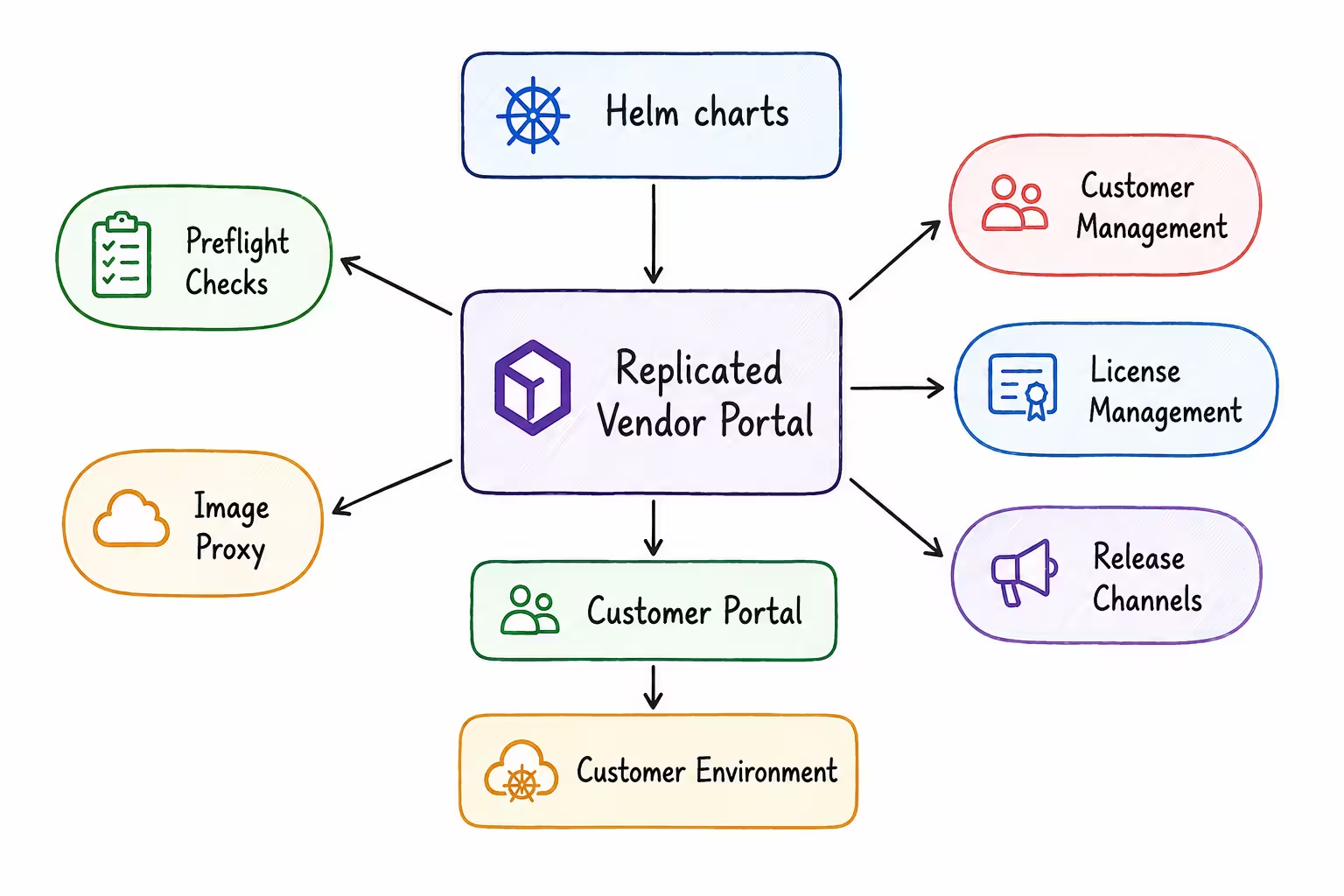
Instead of manually sharing Helm charts, registry credentials, and installation instructions, everything became part of a single distribution platform.
Each customer receives a license, downloads the correct release, runs preflight checks before installation, and securely pulls container images through Replicated.
From our side, we also gained visibility into customer installations and release adoption, making upgrades and support much easier.
Introduction to Replicated
Replicated is a software distribution platform built for companies that deliver applications into customer-managed environments. It adds the operational features that are typically missing when distributing applications. For software vendors, it provides a central platform to package applications, manage customers, publish releases, distribute container images, support air-gapped environments, and simplify enterprise deployments.
How Replicated helped us in practice
What made Replicated useful for us was not just the individual features, but the way those features worked together to remove a lot of the manual work around software delivery.
Before Replicated, our process depended on a mix of Helm charts, private container images, customer-specific instructions, and manual coordination whenever a new release went out. That worked for a while, but as more customers started using the product, it became harder to manage consistently.
Replicated gave us a more structured way to handle that entire workflow without changing the way our application itself is built.
Smoother installation
One of the biggest improvements was the installation flow.
Because our application was already packaged with Helm, we did not need to redesign our deployment process or move to a different packaging model. Replicated fit into the workflow we already had, which made adoption much easier for our team.
It also helped us catch environmental issues earlier. Instead of customers discovering missing prerequisites only after a failed install, we could validate their cluster before deployment began. That meant fewer surprises during installation and less back-and-forth with support.
Better visibility into Customers
Another major improvement was visibility.
Before Replicated, once a customer installed our software, it was difficult to know exactly what version they were running or whether the installation had completed successfully. That made support and upgrade planning more difficult than it needed to be.
With Replicated, each installation is tied to a customer license, which gives us a much clearer view of who is running what. That visibility helps us support customers faster, understand adoption patterns, and manage upgrades more effectively.
Simpler Image delivery
Container image distribution was one of the most painful parts of our old process.
Customers either needed access to our private registry or had to mirror images themselves, which added unnecessary complexity and created room for mistakes. Replicated and simplified that by handling image access through its own delivery mechanism.
That meant customers could install the application without dealing with registry credentials or manual image syncing, and we no longer had to manage those extra steps for every release.
What is the change for us
Moving to Replicated didn't change how we build or deploy our application. We still use Helm.
The biggest difference is that software distribution is now managed through a platform designed specifically for enterprise Kubernetes applications.
Instead of manually managing Helm charts, registry credentials, releases, customer installations, and licensing, those responsibilities are now centralized.
As our customer base continues to grow, this has made software delivery more reliable, easier to support, and much simpler to operate.
What changed was everything around the deployment process.
Instead of handling releases, customer access, image distribution, and installation checks separately, those responsibilities are now managed in one place. That has made our software delivery process more reliable, easier to support, and much easier to scale as our customer base continues to grow.
Replicated Demo
Now that we've covered why we moved to Replicated and the problems it solves, let's look at how a typical application is onboarded.
In this demo, we'll use the Replicated CLI to package and upload an existing Helm chart. The application used here is our Kubernetes application, but the workflow is the same for any Helm-based application.
Pre-requisites
Before getting started, make sure you have:
- A Replicated vendor account
- The Replicated CLI is installed
- Logged in to the Replicated CLI using
replicated login
In the browser window that opens, follow the prompt to log in to your Vendor Portal account and authorize the CLI.
Create an Application
The first step is to create an application in Replicated. Think of an application as a container that holds everything related to your product, such as releases, customers, licenses, release channels, and other configurations.
Create a new application by running:
replicated app create test-helm-chart
You can verify that the application was created by listing all applications:
replicated app ls
The output will look similar to this:
NAME               SLUG

test-helm-chart    test-helm-chart
bash
Make a note of the Application Slug. You'll use it later when uploading releases.
At this point, you've only created an empty application. It doesn't contain any Helm charts or releases yet.
Prepare the Release Directory
we need to prepare a directory that contains everything required for the release. Create a new directory
mkdir replicated-demo
cd replicated-demo
bash
Move the packaged chart into the release directory, i.e replicated-demo
Tell Replicated about your Helm Chart
Replicated doesn't require you to convert your application into a different package format. If your application is already deployed using Helm, you can continue using the same Helm chart.
The only thing Replicated needs is a small configuration file that tells it which Helm chart to install and how it should be deployed.
Create a file named k8s-app.yaml
apiVersion: kots.io/v1beta1
kind: HelmChart
metadata:
  name: test-platform
spec:
  helmVersion: v3
  chart:
    name: test-helm-chart
    chartVersion: '1.1.30'
    releaseName: test-helm-chart
  namespace: test-chart
  helmUpgradeFlags:
    - '--timeout=20m'
    - '--debug'
yaml
This file acts as a bridge between Replicated and your existing Helm chart.
It tells Replicated:
- Which Helm chart to install
- Which chart version to use
- The Helm release name
- The Kubernetes namespace where the application should be deployed
- Any additional Helm flags to use during installation or upgrades
Upload the Release
Now that our release directory is ready, we can upload it to Replicated.
replicated release create --app test-helm-chart --yaml-dir .
bash
Here, the --yaml-dir . option tells the Replicated CLI to upload everything from the current directory, including the packaged Helm chart and the Replicated configuration file.
After the upload completes, a new release is created in your Vendor Portal. At this stage, the release exists in Replicated, but it hasn't been assigned to a release channel or made available to customers yet.
Publish the Release
After the release is created, the next step is to publish it to a release channel.
A release channel is simply a way to control which version of your application different customers receive. Instead of giving every customer the latest release, you can organize releases into channels such as Internal, Beta, Stable, etc.
Open your application in the Replicated Vendor Portal and navigate to the Releases page.
Select the release you just uploaded and publish it to the desired channel.
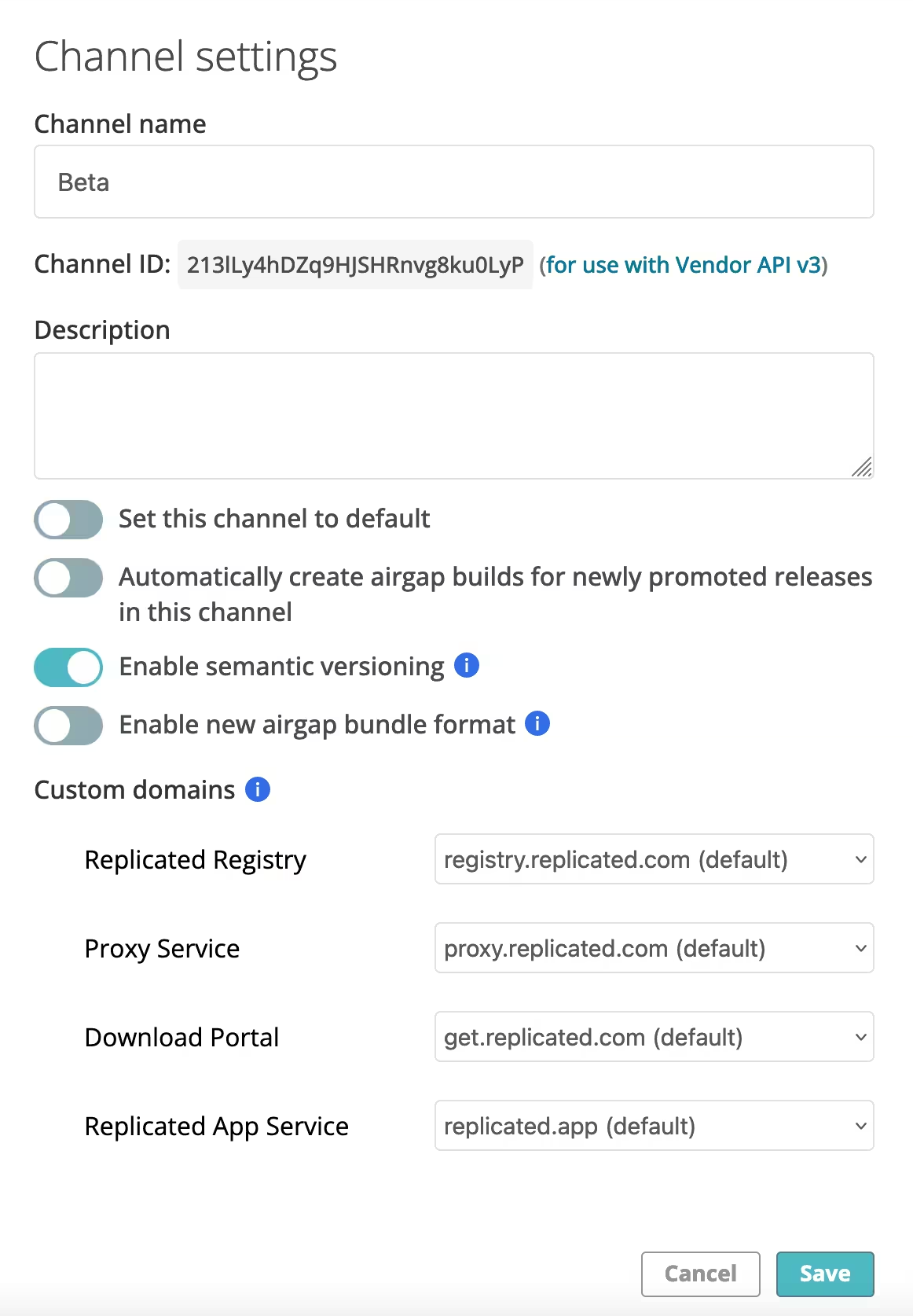
The same release can be moved to a different channel, such as stable or unstable.
Create a Customer
With the release published, the next step is to create a customer.
In Replicated, every installation is associated with a customer. This allows you to manage licenses, control which release channel they receive updates from, and keep track of their deployments.
To create a customer, open your application in the Vendor Portal and navigate to Customers.
Click Create Customer and enter the required details, such as:
- Customer name
- Customer email (optional)
- Assigned release channel
- License expiration (optional)
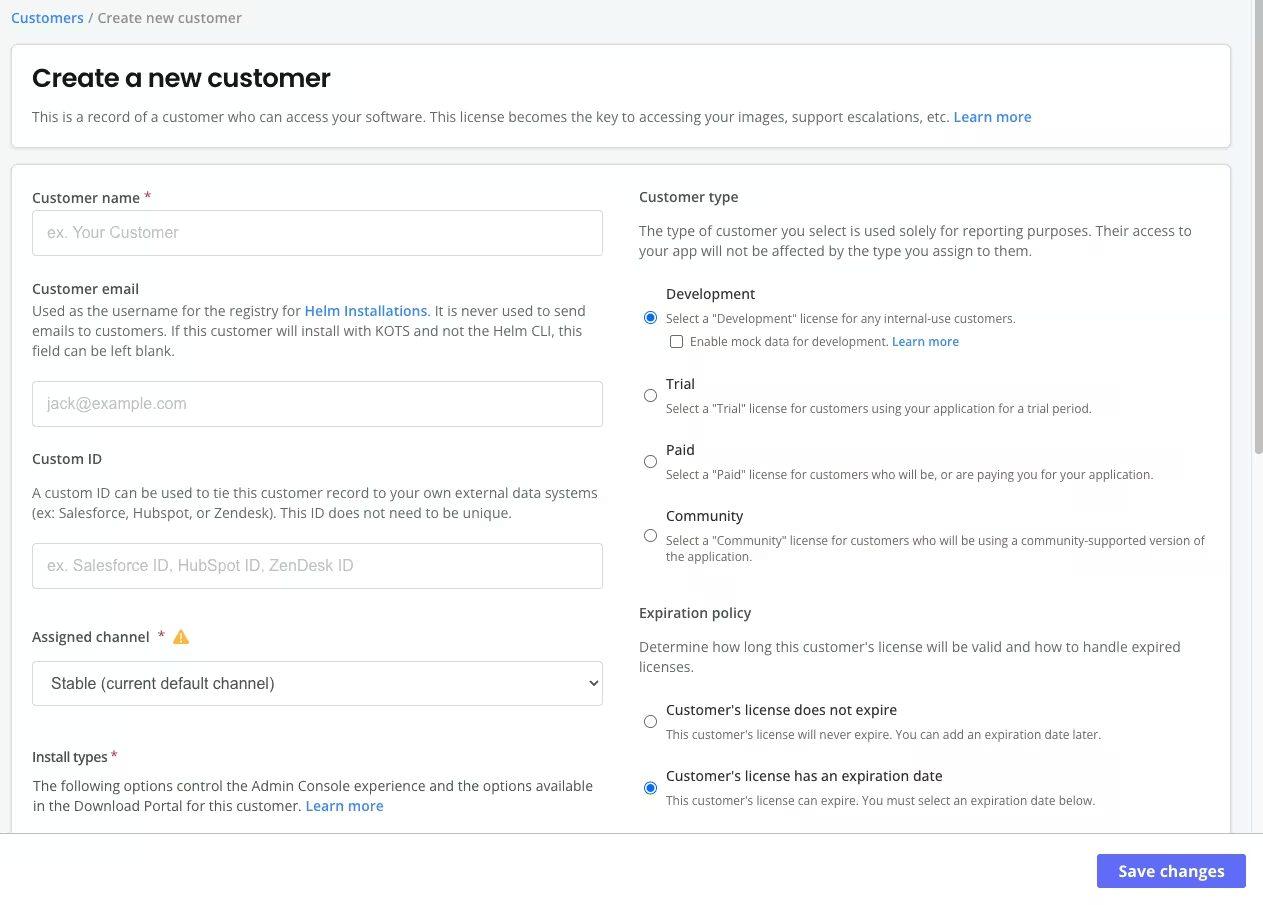
Once the customer is created, Replicated automatically generates a license for that customer.
This license is unique and acts as the customer's identity. It determines what the customer can install, which release channel they have access to, and any additional entitlements you choose to configure.
Installing the Application
The customer logs in to the Replicated Customer Portal using the link shared by the vendor. From there, they can view the applications available to them and select the version they want to install.
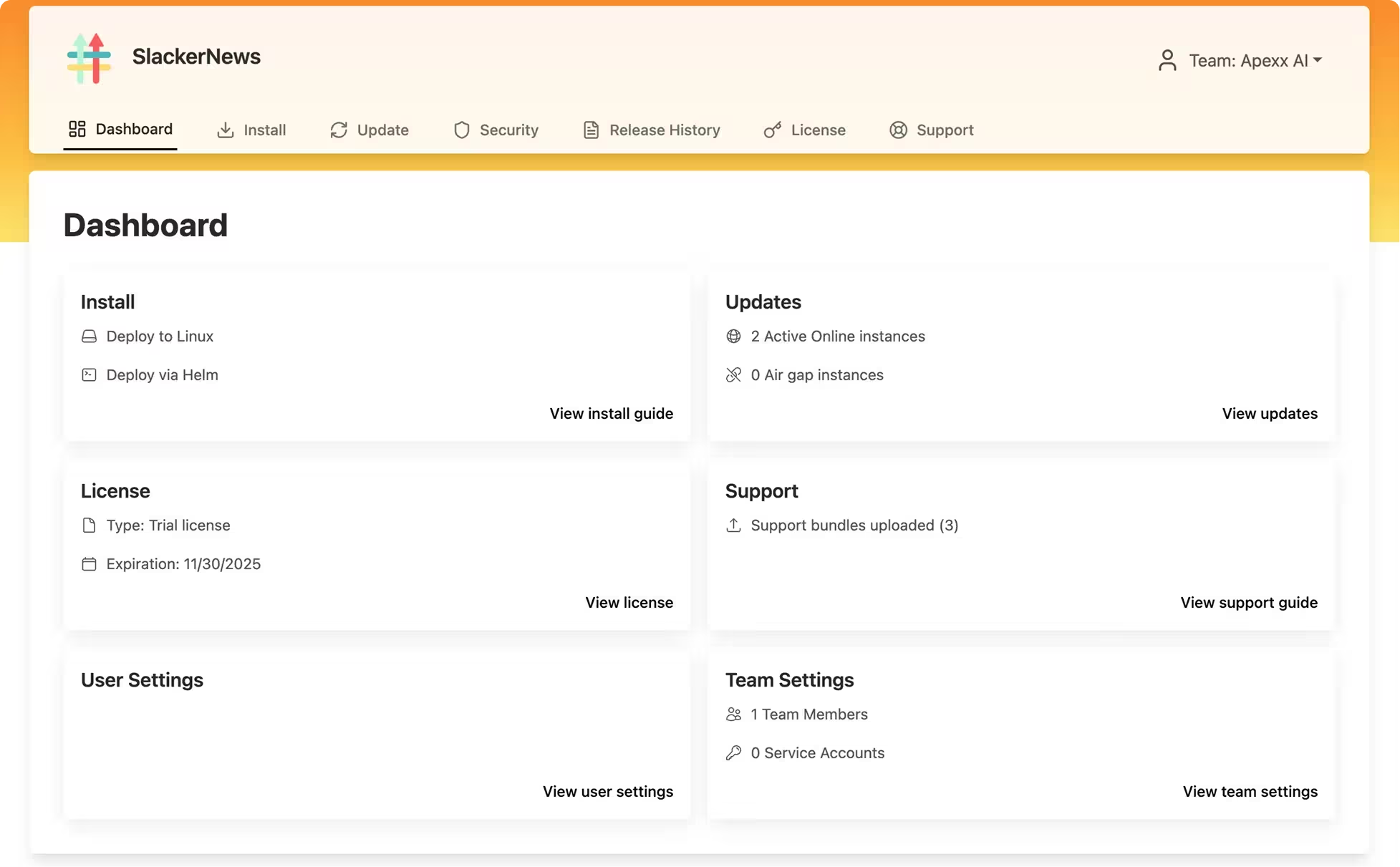
The customer can go through the portal and install the application via the install guide, and they can see the updates. License on the portal. Before the installation gets started, Customer need to follow some steps, i.e running preflight checks, pre-install commands, and creating imagepullsecrets.
The Future of Enterprise Software Distribution
As AI adoption accelerates, enterprises are becoming far more selective about where their applications and data reside. Regulatory compliance, data sovereignty, intellectual property protection, and internal security policies increasingly require software to run within customer-controlled environments—whether that's a dedicated VPC, private cloud, or fully air-gapped data center. If your product architecture assumes a public SaaS deployment, adapting it later for enterprise distribution can become a significant engineering effort that delays deals and increases the cost of serving enterprise customers.
If enterprise customers are part of your go-to-market strategy, portability should be treated as a core architectural principle rather than an afterthought. Designing applications to be cloud-native, self-contained, and deployable across diverse environments from day one makes it easier to meet enterprise requirements without maintaining multiple product variants. This trend is especially pronounced for AI-native applications, where organizations are often reluctant to send proprietary data or models outside their security boundary.
At CloudRaft, we've helped multiple SaaS companies evolve from SaaS-only deployments to enterprise-ready software that can be securely distributed across Kubernetes clusters running in public clouds, private clouds, customer VPCs, and air-gapped environments. From packaging and release management to automated installation, upgrades, observability, and lifecycle management, we help engineering teams build a cloud-native software distribution platform that scales with enterprise adoption. If you're planning to sell into the enterprise market, we'd be happy to discuss your architecture and help you design a distribution strategy that won't become a bottleneck as your business grows.