If you are running a heavy SaaS platform, you eventually hit a wall with PostgreSQL. It's fantastic for transactional data (OLTP), but when you try to run complex analytical queries on millions of rows, things slow down.
We recently tackled this exact problem for a client handling high-volume messaging operations. In one of our customers' analytics dashboards, they were using an AWS Aurora PostgreSQL setup to run analytical queries, and they needed a solution that was fast, reliable, and real-time.
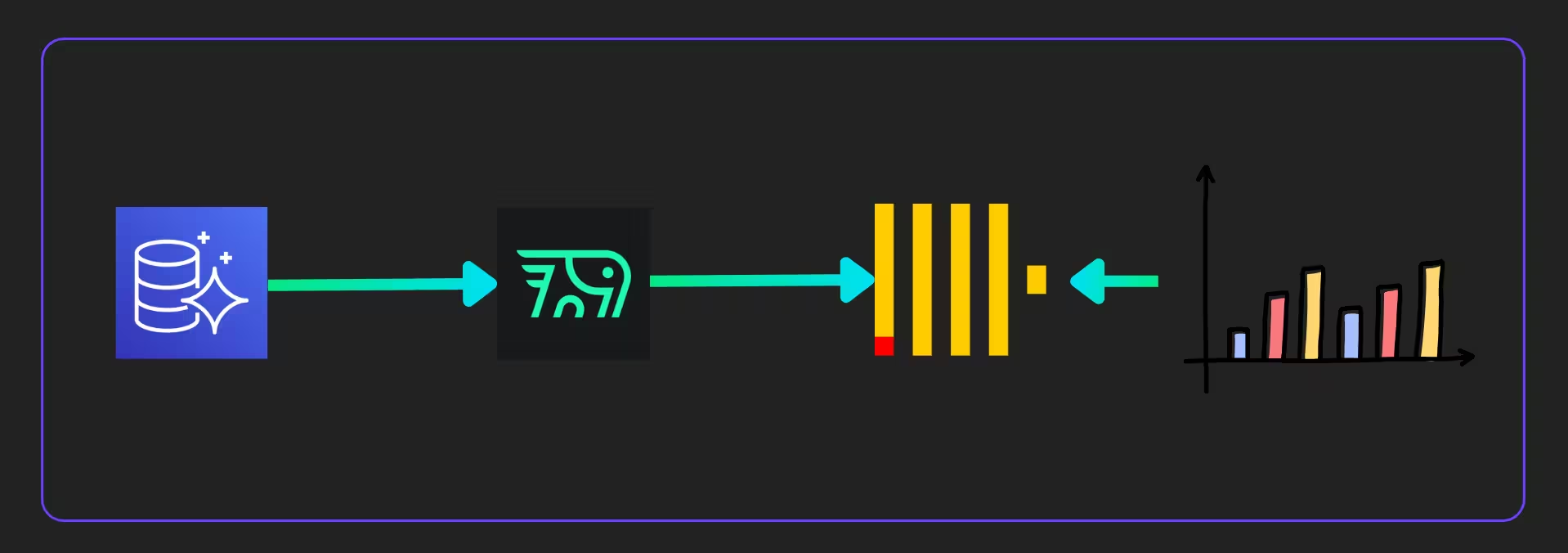
Here is how we solved it by building a high-performance replication pipeline from Postgres to ClickHouse using PeerDB.
Why ClickHouse?
ClickHouse is the superior choice for analytics because it is a purpose-built OLAP database designed for high-performance data processing, unlike PostgreSQL, which is a row-based OLTP system better suited for transactional workloads. Its columnar storage architecture allows it to handle massive datasets with sub-millisecond latency, where standard Postgres deployments often hit performance walls. By switching to ClickHouse, you gain the ability to ingest millions of rows and execute complex analytical queries instantly, solving the performance limitations inherent in using PostgreSQL for analytics.
The CDC Landscape: Why We Chose PeerDB
Real-time Change Data Capture (CDC) is the standard for moving data without slowing down your primary database. But how do you implement it? Here are the primary CDC (Change Data Capture) options for replicating data from PostgreSQL to ClickHouse that we have considered in our implementation.
1. PeerDB
PeerDB is a specialised tool designed specifically for PostgreSQL to ClickHouse replication. It was the chosen solution in the provided design document due to its balance of performance and simplicity.
Architecture: It can run as a Docker container stack (PeerDB Server, UI, etc.) and connects directly to the Postgres logical replication slot.
Pros:
- High Performance: PeerDB was found to be very performant as compared to other solutions.
- Specialised Features: It handles initial snapshots (bulk loads) and real-time streaming (CDC) seamlessly. It also supports specific optimisations, such as dividing tables into multiple "mirrors" to speed up initial loads.
- Simplicity: It avoids the complexity of managing a full Kafka cluster.
Cons: - Community Edition Limits: The community edition lacks built-in authentication for the UI, requiring private network access or VPNs for security or another way to add authentication for the UI.
2. Altinity Sink Connector for ClickHouse
This is a lightweight, single-executable solution often used to avoid the complexity of Kafka. It is developed by Altinity, a major ClickHouse contributor.
Architecture: It runs as a standalone binary or within a Kafka Connect environment. It connects to Postgres and replicates data to ClickHouse.
Pros:
- Operational Simplicity: It eliminates the need for a Kafka Connect cluster or ZooKeeper, running as a single executable.
- Direct Replication: Offers a direct path from Postgres to ClickHouse.
- Auto Schema: Can automatically read the Postgres schema and create equivalent ClickHouse tables.
- Cons:
- Performance: In the referenced document, this option was tested but rejected because it did not meet the performance requirements compared to PeerDB.
3. Debezium and Kafka
This is the industry-standard approach for general-purpose CDC, involving a chain of distinct complex components.
Architecture: Postgres → Debezium (Kafka Connect) → Kafka Broker → ClickHouse Sink → ClickHouse.
Pros:
- Decoupling: The message broker (Kafka) decouples the source from the destination, allowing multiple consumers to read the same stream.
- Reliability: Extremely robust for guaranteed message delivery and exactly-once processing (if configured correctly).
Cons: - High Complexity: Requires managing Zookeeper, Kafka Brokers, and Schema Registries. The provided document explicitly mentions avoiding "Kafka Connect framework complexity" as a goal.
- Overhead: Significant infrastructure footprint compared to direct replication tools.
Why PeerDB?
We initially tested the Altinity connector but ultimately chose PeerDB. Mainly because of following reasons.
- Performance: In our testing, PeerDB offered superior performance for our specific workload compared to other connectors we tried.
- Specialisation: It is purpose-built for Postgres-to-ClickHouse replication, handling data type mapping and initial snapshots smoothly.
The Architecture
We opted for a "Keep It Simple" approach to infrastructure. While Kubernetes (EKS) is great, we deployed this on Amazon EC2 to maintain full control over the infrastructure and cost. If you have a team that can handle EKS for you, then that might be a better option. Please discuss with our team to find the right solutions for your workload and team.
The Setup:
- Source: AWS Aurora (PostgreSQL)
- The Pipeline: PeerDB running via Docker Compose
- Destination: A ClickHouse cluster
High Availability Design
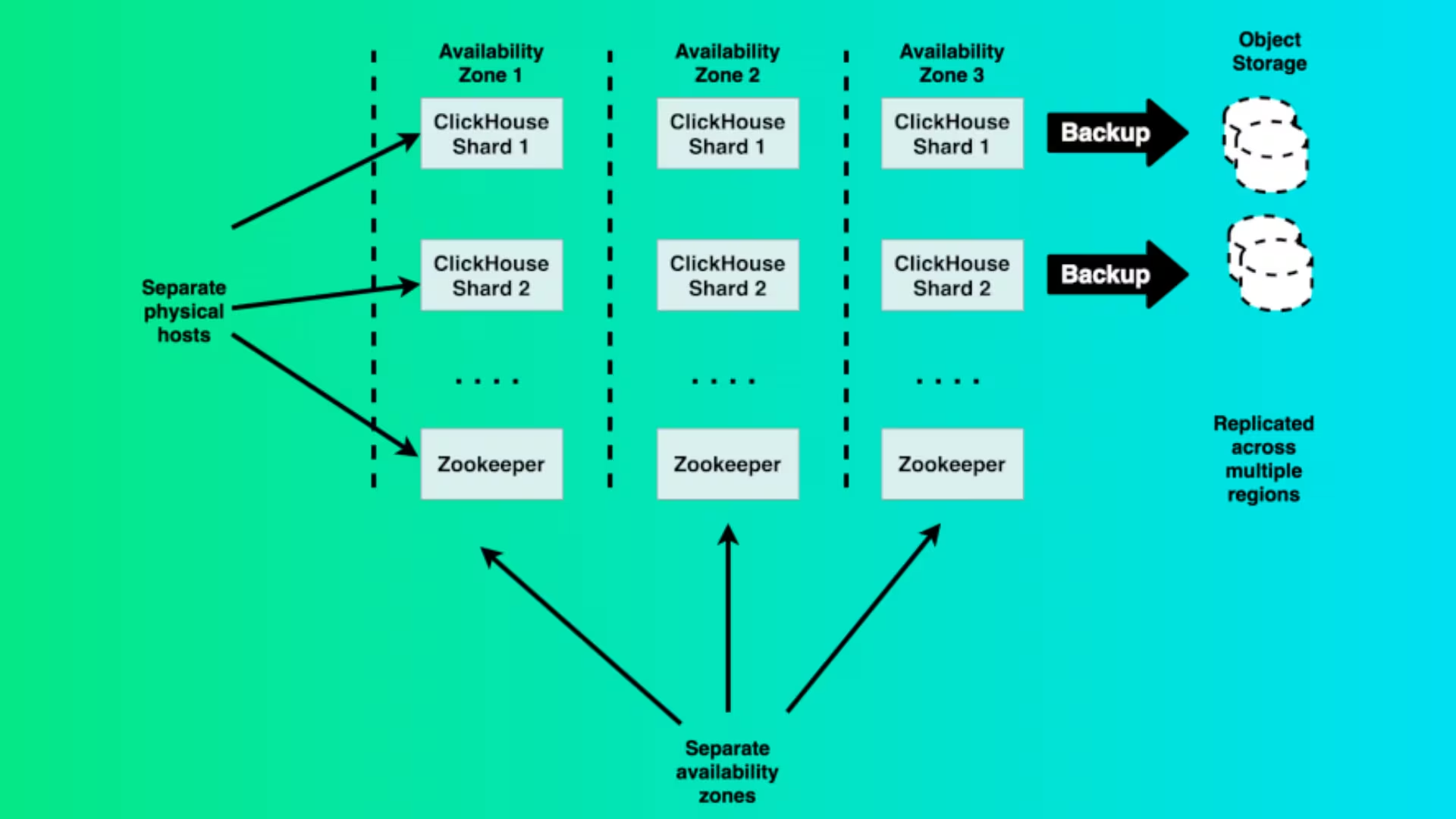 Source: Altinity
To ensure we never lost data, we configured a ClickHouse cluster with:
- 3 Keeper Nodes: Using m6i.large instances. These replace ZooKeeper for coordination
- 2 ClickHouse Server Nodes: Using r6i.2xlarge instances for heavy lifting
- Replication: We used ReplicatedMergeTree to ensure data exists on multiple nodes for safety
ClickHouse Cluster
We automated the deployment using Ansible to configure the hardware-aware settings. A cool feature of our setup is that the configuration automatically calculates memory limits and cache sizes based on the EC2 instance's RAM (e.g., leaving 25% for the OS and giving 75% to ClickHouse). We wrote about this earlier in our previous blog post.
Installing PeerDB
We used Docker Compose to spin up the PeerDB stack. One specific nuance we encountered was configuring the storage abstraction. PeerDB uses MinIO (S3 compatible) for intermediate storage. We had to explicitly set the PEERDB_CLICKHOUSE_AWS_CREDENTIALS_AWS_ENDPOINT_URL_S3 environment variable in our docker-compose.yml to point to our MinIO host IP.
Set up the peers to connect with the source and destination.
Creating the "Mirror"
PeerDB uses a concept called Mirrors to handle the CDC pipeline. We set up the connection by defining:
- The Peer (Source): Our Aurora Postgres instance
- The Peer (Destination): Our ClickHouse cluster
- The Mirror: The actual replication job
PeerDB support different modes of streaming - log based (CDC), cursor based (timestamp or integer) and XMIN based. In our implementation, we used log based (CDC) replication.
To optimise the initial data load, we didn't just dump everything at once. We divided our tables into multiple "batches" (mirrors) to run in parallel and started at different times so that we do not cause a high load on the source.
"Gotchas" From the Trenches
No migration is perfect. Here are three issues we faced so you can avoid them:
- The "Too Many Parts" Error in ClickHouse
ClickHouse loves big batches of data. If PeerDB syncs records one by one or in tiny groups too quickly, ClickHouse can't merge the data parts fast enough in the background. We saw errors like Too many parts... Merges are processing significantly slower than inserts.
- Fix: You may need to tune the batch size or frequency to slow down the inserts slightly, allowing ClickHouse's merge process to catch up.
- Aurora Failovers Break Things
If AWS Aurora triggers a failover, the IP/DNS resolution might shift. We found that this can break the peering connection.
- Fix: You have to edit the peer configuration to point to the new primary host and resync the mirror.
- Security on Community Edition We used the community edition of PeerDB. Be aware that it does not have built-in authentication for the UI.
- Fix: Do not expose the UI to the public internet. We access it via private IP/VPN or put an authentication layer using a third-party product.
Conclusion and Key Takeaways
By successfully moving analytical queries off the primary Postgres instance and into ClickHouse, we achieved the sub-millisecond query performance our client required. PeerDB provided us with a robust, real-time CDC solution without the operational headache of managing a Kafka cluster.
Key Takeaways on the Postgres + ClickHouse + PeerDB Combination:
- Performance: You get the best of both worlds: PostgreSQL handles fast, reliable transactional (OLTP) workloads, while ClickHouse takes on complex analytical (OLAP) queries with unmatched speed. This separation prevents slow analytical queries from impacting your core application database.
- Real-Time Simplicity: PeerDB acts as a purpose-built, high-performance bridge. It removes the need to deploy and manage a complex, multi-component CDC stack like Debezium and Kafka, significantly reducing infrastructure complexity and operational overhead.
- Scalability: This architecture allows your analytics layer (ClickHouse) to scale independently from your transactional layer (Postgres), ensuring that as your data volumes grow, you maintain both OLTP stability and OLAP speed.
- Cost-Effectiveness: By offloading analytical processing, you can often run a smaller, more cost-effective Postgres instance dedicated to its core function, while leveraging ClickHouse's efficiency for massive-scale querying.
Are you looking to improve your analytics pipeline? Please book a call with us to discuss your case.