Introduction
Data is at the core of almost every modern application, but it is rarely stored in a way that makes it immediately useful. Data engineering focuses on moving data from source systems, shaping it, and storing it so it can be analyzed and queried later. As applications scale and data volumes grow, building reliable and flexible data pipelines becomes an essential part of the system. On AWS, this is usually done using managed services that work well together—such as DynamoDB for storage, Kinesis for streaming, S3 for durable data lakes, and Glue and Athena for cataloging and querying. These services reduce operational effort, but building a dependable pipeline still requires careful handling of streaming behavior and schema changes.
In one of our recent projects, we needed to build a near real-time data pipeline that streamed data from DynamoDB into S3 (S3 Tables). The goal was to make this data available in real time for analytics while keeping the system scalable and future-ready. The pipeline had to handle frequent updates, concurrent writes, and schema changes, all without creating duplicate records when existing data was updated. Building this pipeline gave us a deeper understanding of how these systems behave in real-world, production environments.
In this article, I’ll walk through this DynamoDB-to-S3 streaming setup on AWS, explain the architecture choices, and share some of the practical issues we encountered along the way—along with what worked and what didn’t.
Data Analytics on AWS: Core Services
AWS Glue
AWS Glue provides a centralized data catalog that stores metadata about datasets in S3. It keeps track of table definitions, column types, and partitions. Glue makes it easier for query engines and processing jobs to discover and use data consistently.
Amazon Athena
Athena lets you query data in S3 using standard SQL without provisioning any infrastructure. It is commonly used for analytics, debugging pipelines, and validating data. Athena works directly with Glue tables and supports modern table formats like Iceberg.
Amazon Kinesis Data Streams
Kinesis Data Streams is used to capture high-volume, real-time data from multiple sources. It allows applications to consume and process data as it arrives. This makes it useful when low latency and ordered processing are important.
Amazon Kinesis Data Firehose
Firehose is a fully managed delivery service for streaming data. It buffers, batches, and reliably writes data to destinations like S3. Firehose is often used as the final step to land streaming data into analytics-ready storage.
Amazon MSK (Managed Streaming for Apache Kafka)
Amazon MSK provides a managed Apache Kafka environment without the operational overhead. It is used for complex event-driven architectures where fine control over streaming behavior is needed. MSK integrates well with downstream analytics and storage systems.
S3 Tables (Apache Iceberg)
Apache Iceberg is essentially a way to bring some structure and discipline to data sitting in object storage like S3. Instead of treating data as a bunch of files, Iceberg lets you work with it as a proper table. It keeps track of things like schema, partitions, and table metadata, which makes the data much easier and safer to query as it grows.
One thing Iceberg does really well is handle change. Columns can be added over time, records can be updated or deleted, and queries still return a consistent view of the data. This matters a lot when you’re dealing with streaming or near real-time pipelines, where data keeps changing and the schema isn’t always final from the start.
On AWS, S3 Tables build on top of Iceberg and take away a lot of the heavy lifting. You still get open formats like Parquet under the hood, but AWS manages the table metadata and layout for you. That means fewer moving parts to maintain and fewer things that can go wrong.
For our DynamoDB-to-S3 pipeline, this fits naturally. We needed to keep the latest version of records, support updates without creating duplicates, and still run analytical queries easily. Using Iceberg through S3 Tables gave us exactly that, without turning the storage layer into something we had to constantly manage ourselves.
Architecture Considerations
Why is the Firehose at the Center of This Design?
Before diving into the different approaches, it’s worth calling out one thing upfront: Firehose sits at the center of all of them.
In our case, Firehose was responsible for writing data into S3 Tables in Iceberg format. It handled batching, buffering, and file management, and made the data immediately queryable through Athena. Because of this tight integration, Firehose naturally became the final step in the pipeline.
So instead of thinking about three completely different architectures, it was more accurate to think about three different ways of feeding data into Firehose.
Approach 1: DynamoDB Streams → Lambda → Firehose → S3 Tables (Iceberg)
In this approach, DynamoDB Streams capture data changes and trigger a Lambda function. The Lambda function converts the DynamoDB JSON format into regular JSON and then sends the records to Firehose. Firehose takes care of batching, buffering, and writing the data to S3 Tables in Iceberg format, making it immediately queryable through Athena. This setup keeps the architecture simple, with fewer components to manage and reason about. Since the data is already transformed in Lambda before being sent to Firehose, there’s no need to enable Firehose’s Lambda transformation, which helps keep the pipeline straightforward and easier to operate.
Approach 2: DynamoDB → Kinesis Data Streams → Firehose
Another option we explored was routing DynamoDB changes through Kinesis Data Streams and then forwarding them to Firehose. Kinesis does offer more control around stream processing, scaling, and fan-out, which can be useful in more complex setups. In our case, though, it didn’t simplify the pipeline. The data coming from DynamoDB Streams was still in DynamoDB JSON format, so we had to use a Lambda function to transform it before Firehose could write it to S3 Tables. This meant adding another moving part without really gaining much. It also brought in additional cost and operational overhead, and for our requirements, it didn’t solve any problem that wasn’t already handled in a simpler way.
Approach 3: DynamoDB → MSK → Firehose → S3 Tables
In this approach, changes from DynamoDB are pushed into an MSK (Kafka) topic, and Firehose consumes those messages and writes them into S3 Tables using Iceberg. This can be a good option if Kafka is already being used, since it allows multiple consumers, flexible retention, and clear separation between producers and downstream systems. Firehose fits in neatly here by taking care of batching and delivering the data to S3, while DynamoDB data can be published to Kafka through a custom producer or a Lambda reading from DynamoDB Streams. However, for our use case, this setup added more complexity than we actually needed. Running and managing MSK also increased costs, which made it less practical for a pipeline whose main goal was to stream DynamoDB data into S3 for analytics.
Why did we choose the first approach?
After evaluating all three options, the DynamoDB Streams → Lambda → Firehose approach stood out as the most practical choice.
Kinesis added flexibility, but not without keeping Lambda in the loop for data transformation. MSK provided power we didn’t actually need, at a much higher cost. The first approach kept the architecture simple, serverless, and closely aligned with Firehose’s native integration with S3 Tables.
Most importantly, it let Firehose do what it does best—efficiently writing analytics-ready data to Iceberg—without introducing unnecessary complexity upstream.
Final Architecture
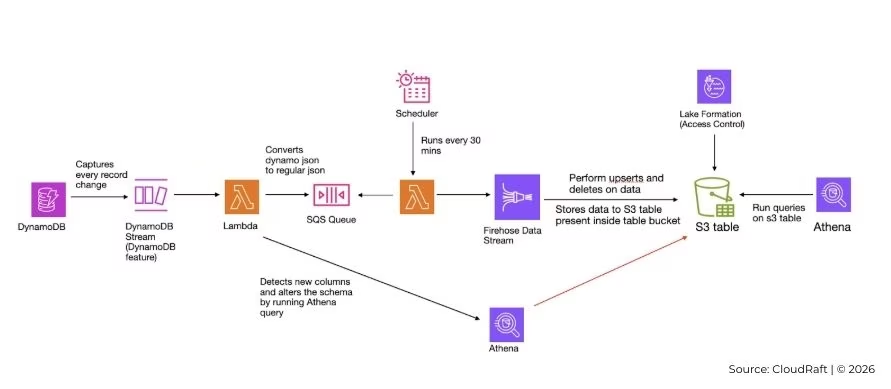
Our goal was to build a near real-time data pipeline that streams data from DynamoDB into S3, making it ready for analytics while handling schema changes and updates safely. The pipeline needed to maintain the latest state of each record, avoid duplicates, and scale for future growth.
At a high level, DynamoDB Streams capture all changes in the source table. A Lambda function transforms these events and manages schema updates, while SQS queues decouple schema changes from data ingestion. Firehose delivers the data into S3 Tables backed by Apache Iceberg, and Athena allows for direct queries on the stored data. Lake Formation ensures secure access to the tables. This setup ensures data consistency, supports schema evolution, and keeps analytics queries accurate and reliable.
Detailed Explanation
DynamoDB and Streams
Data is stored in DynamoDB, and DynamoDB Streams are enabled to capture every insert, update, or delete operation. These streams provide the event source for downstream processing.
Schema Change Lambda Function
The Lambda triggered by the stream has several responsibilities:
- Converts DynamoDB JSON records into regular JSON.
- Adds an action field to indicate insert/update or delete.
- Checks if new columns are present in the record.
- Updates the Iceberg table schema using Athena if a new column is detected.
- Send a sample record for the new column to Firehose.
- Logs schema changes in a DynamoDB tracking table with a status of sent.
- Place the record into an SQS queue. If there’s no schema change, the record is simply queued.
Queue Processing Lambda Function
A second Lambda runs on a schedule to process the queued records:
- Checks the schema tracking table for any new columns with status sent.
- Validates the sample records in the Iceberg table.
- If validation succeeds, it deletes the sample records and marks the status as completed.
- Polls messages from the SQS queue, sends them to Firehose, and removes them from the queue.
- If validation fails, it rewrites the sample records to Firehose to ensure the schema is recognized correctly.
Amazon Firehose
Firehose handles batching, buffering, and delivery of records to S3 Tables in Iceberg format. Based on the action field, it performs upserts or deletes, ensuring that the table always reflects the latest state of the data.
S3 Tables and Apache Iceberg
Iceberg adds a table layer on top of S3 storage, keeping track of schema, partitions, and snapshots. Using Iceberg with S3 Tables simplifies file and metadata management while supporting updates, deletes, and schema evolution without breaking queries.
Athena and Lake Formation
Athena queries the Iceberg tables directly in S3 for analytics. Lake Formation manages permissions, ensuring secure access to the database and tables.
Initial Migration
Before we could rely on the streaming pipeline, we also had to deal with the data that already existed in DynamoDB. Streaming only captures changes from the point it’s enabled, so without a backfill, all historical records would be missing from S3 and Athena.
To handle this, we did a one-time migration of the existing DynamoDB data. For this, we have created a migration utility.
The idea was simple: read the current state of the DynamoDB table and load it into S3 in a format that Athena could query. The approach in the repository helped with scanning the DynamoDB table and exporting all items to S3 in a structured way.
Once the data was exported, we made sure it followed the same shape expected by our streaming pipeline. This was important because we wanted historical data and new incoming changes to be treated the same way. Instead of creating a separate path just for migration, the exported records were pushed through the same logic we already had—schema detection, Iceberg table updates, and upsert handling.
Doing it this way gave us a clean starting point. Athena could immediately query the full dataset in S3, and once the migration was complete, DynamoDB Streams took over for ongoing changes. From that point on, both historical and real-time data lived in the same Iceberg table and behaved consistently during analysis.
Conclusion
This setup helped us move DynamoDB data into S3 in a way that was reliable, scalable, and actually usable for analytics. By combining DynamoDB Streams, Lambda, Firehose, and Iceberg on S3 Tables, we were able to keep the data close to real time while still handling updates, deletes, and schema changes cleanly.
One of the biggest lessons from this work was how important schema handling is in streaming pipelines. Changes don’t always show up when you expect them to, and if you don’t plan for that, data can quietly go missing. Treating schema changes as a first-class part of the pipeline made the whole system far more predictable and easier to operate.
Athena worked well for querying the data because it was simple to set up and fit naturally with S3 Tables. For most use cases, ad-hoc queries, validation checks, and scheduled reports were more than enough.
Overall, this approach struck a good balance. It kept the architecture simple, avoided unnecessary moving parts, and still left room to scale and evolve over time. If you’re building a similar DynamoDB-to-S3 analytics pipeline, this pattern is a solid place to start.
Struggling with schema evolution or duplicate records in your data pipeline? We can help you design, build and deploy a production-grade streaming pipeline tailored to your use case. Get in touch with our team.