Introduction
Imagine asking an AI system to research a topic, analyze multiple sources, write a detailed report, fact check its own output, and then revise the final draft. While a single agent can attempt all of these tasks, it's basically being asked to play several different roles at once. The same model must gather information, reason over it, generate content, evaluate quality, and decide what to do next.
This creates a number of challenges:
- Context windows become crowded with information from different stages of the workflow.
- Instructions for one task can interfere with another.
- The agent must constantly switch between responsibilities, increasing the chances of mistakes, hallucinations or incomplete outputs.
These challenges are not something that can be fixed with a better prompt. It needs a better structure. Workflows are growing more complex day by day, adding more prompts and tools often leads to systems that are difficult to debug, maintain, and scale.
Instead of relying on a single model to handle planning, reasoning, retrieval, generation, validation, and making decisions, these responsibilities can be distributed across specialized agents. Each agent operates with a clearly defined objective, and an orchestration layer coordinates how information flows between them.
Separating the responsibilities like this offers several advantages:
- Agents can be optimized for their specific tasks
- Workflows become easier to maintain
- The overall system becomes more reliable for complex, multi-step processes
The key idea is: instead of treating intelligence as a single monolithic process, multi-agent systems break it into smaller, coordinated units that work together toward a shared goal.
The Stack: LangChain, LangGraph, and LangSmith
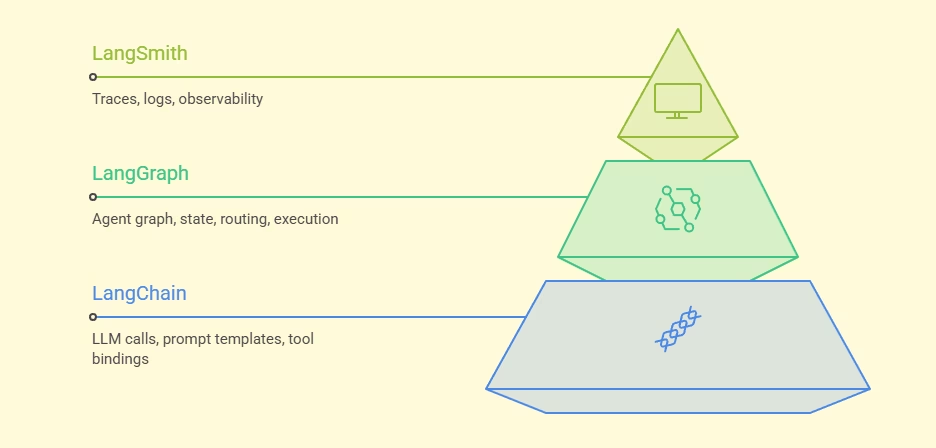
In order to build a multi-agent system, we need three things: something to talk to the model, something to coordinate the agents, and something to tell you what went wrong. That’s exactly what LangChain, LangGraph, and LangSmith each handle. LangChain provides a unified interface for working with different model providers. It handles LLM calls, prompt templates, and tool bindings. Basically it's the layer that talks to the models directly.
LangGraph is the runtime layer that powers agent execution . It was made to handle the coordination problems that come with multi-agent workflows.The workflows are modelled as graphs where:
- Nodes perform work (the agents, tools, validation steps and other execution units)
- Edges define transitions (routing between nodes)
- State carries information between steps (shared memory)
It uses LangChain's LLM integrations, prompt templates, and tool bindings under the hood. LangGraph itself doesn't talk to any model directly, LangChain handles that layer. Multi-agent systems are complex. When Agent A talks to Agent B, who loops back to Agent C, trying to figure out exactly where a hallucination occurred is a nightmare.
LangSmith solves this problem by acting as the observability layer. It works directly alongside LangGraph to give us something like an X-Ray of the multi-agent architecture and traces every single execution, logging the exact prompt generated, the tools called, the token usage, and the latency at every step.
Demo: A simple customer support system
Let's take an example of a customer support system. A complaint first needs to be understood, relevant information must be gathered, and finally a response needs to be generated. Rather than asking a single agent to handle all of these responsibilities, we'll split them across three specialized agents that work together to resolve the issue.
Each agent is responsible for a single task in the pipeline: Classification Agent: Analyze the customer complaint and determine the issue category. Knowledge Base Agent: Retrieve relevant policies, documentation, and support information based on the identified issue category. Response Agent: Generates a clear, helpful, and customer-friendly response using the retrieved information.

Step 1: Install dependencies and set environment variables
pip install langchain langchain-openai langgraph langsmith python-dotenv
bash
Set environment variables in a .env file
GOOGLE_API_KEY=sk-...
LANGCHAIN_TRACING_V2=true
LANGCHAIN_API_KEY=your-langchain-api-key from https://smith.langchain.com
LANGCHAIN_PROJECT=support-pipeline
bash
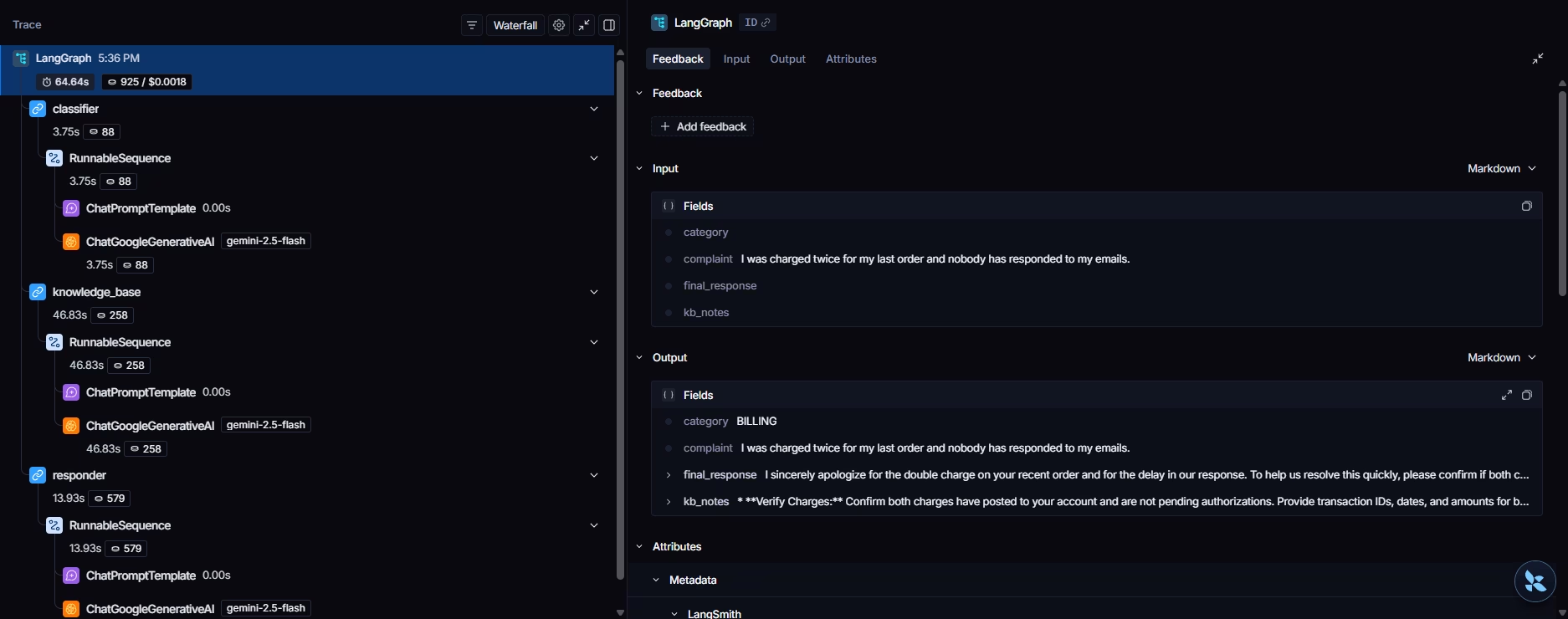
By setting LANGCHAIN_TRACING_V2=true, every LangGraph run will automatically appear as a trace in the LangSmith dashboard. Here’s what the dashboard will look like once the pipeline is executed.
Step 2: Set Up the LLM with LangChain
For this example we are using Google's gemini as it offers a free tier for API requests for some of its models.
from langchain_google_genai import ChatGoogleGenerativeAI
from langchain_core.prompts import ChatPromptTemplate
import os
from dotenv import load_dotenv

load_dotenv()

llm = ChatGoogleGenerativeAI(
    model="gemini-2.5-flash",
    temperature=0.3,
    google_api_key=os.getenv("GOOGLE_API_KEY")
)

# Classify the complaint into a category
classifier_prompt = ChatPromptTemplate.from_messages([
    ("system", """Classify the complaint into exactly one category.
Reply with only the category name and nothing else.
Categories: BILLING, TECHNICAL, SHIPPING, REFUND, OTHER"""),
    ("human", "Complaint: {complaint}")
])

# Fetch relevant knowledge base context for the category
kb_prompt = ChatPromptTemplate.from_messages([
    ("system", """You are a knowledge base agent. Given a complaint category,
return 2-3 concise bullet points of relevant policy or resolution steps."""),
    ("human", "Category: {category}\nComplaint: {complaint}")
])

# Drafting a helpful response using the KB context
response_prompt = ChatPromptTemplate.from_messages([
    ("system", """You are a customer support agent. Write a helpful, empathetic
reply to the customer. Use the knowledge base notes to inform your answer.
Be concise -- 3 to 5 sentences."""),
    ("human", "Complaint: {complaint}\nCategory: {category}\nKB notes: {kb_notes}")
])
python
Step 3: Define the State Schema
State is a Python dictionary every agent reads from and writes to. Each agent only touches the keys it owns. It's how the information flows between the nodes.
from typing import TypedDict

class SupportState(TypedDict):
    complaint: str        # Input:  the user's raw complaint text
    category: str         # Set by: Classification agent
    kb_notes: str         # Set by: Knowledge Base agent
    final_response: str   # Set by: Response agent
python
Step 4: Build the Agent Nodes
Each node is a Python function that takes the current state, does one job, and returns a dictionary of the state keys it wants to update.
from llm import llm, classifier_prompt, kb_prompt, response_prompt
from state import SupportState

def classification_node(state: SupportState) -> dict:
    chain = classifier_prompt | llm
    result = chain.invoke({"complaint": state["complaint"]})
    category = result.content.strip().upper()
    # Normalise to known categories. Defaults to "OTHER"
    valid = {"BILLING", "TECHNICAL", "SHIPPING", "REFUND", "OTHER"}
    return {"category": category if category in valid else "OTHER"}


def knowledge_base_node(state: SupportState) -> dict:
    chain = kb_prompt | llm
    result = chain.invoke({
        "category":  state["category"],
        "complaint": state["complaint"]
    })
    return {"kb_notes": result.content}


def response_node(state: SupportState) -> dict:
    chain = response_prompt | llm
    result = chain.invoke({
        "complaint": state["complaint"],
        "category":  state["category"],
        "kb_notes":  state["kb_notes"]
    })
    return {"final_response": result.content}
python
Nodes only return the keys they update and not the full state. LangGraph merges the returned dictionary into the existing state automatically. Each agent is completely isolated from the others.
Step 5: Compile the Graph
This is where we use LangGraph to register nodes, wire edges between them, and compile.
from langgraph.graph import StateGraph, END
from state import SupportState
from agents import classification_node, knowledge_base_node, response_node

builder = StateGraph(SupportState)

# Register nodes
builder.add_node("classifier",     classification_node)
builder.add_node("knowledge_base", knowledge_base_node)
builder.add_node("responder",      response_node)

# Wire edges -- linear pipeline
builder.set_entry_point("classifier")
builder.add_edge("classifier",     "knowledge_base")
builder.add_edge("knowledge_base", "responder")
builder.add_edge("responder",      END)

graph = builder.compile()
python
Step 6: Run the Graph
After compiling the graph, we can invoke it with a single function call. This is an example run:
from graph import graph
def run(complaint: str):
    print(f"\n{'='*60}")
    print(f"Complaint: {complaint}")
    print("="*60)

    result = graph.invoke({
        "complaint":      complaint,
        "category":       "",
        "kb_notes":       "",
        "final_response": ""
    })

    print(f"Category:  {result['category']}")
    print(f"\nKB Notes:\n{result['kb_notes']}")
    print(f"\nResponse:\n{result['final_response']}")
if __name__ == "__main__":
    run("I was charged twice for my last order and nobody has responded to my emails.")
python
We can change the request in the attribute of the run function to any example like “I want to return a product I bought last week.” or “The app keeps crashing whenever I try to upload a file.”
Here’s what the execution looks like:
Challenges in a Multi-Agent system
As systems grow more complex giving multiple autonomous agents the power to talk to each other and route tasks dynamically can lead to significant problems:
-
State pollution: Since all agents share the same state object, one agent writing sloppy or unexpected data can silently corrupt the input for the next.
Solution: Each state field should have a clear purpose and a well defined structure .
-
Infinite loops: If the routing logic isn't airtight, an agent can keep returning a status that re-routes it back to itself, and as a result the graph spins indefinitely. This can also lead to burning through tokens which increases costs.
Solution: Clear exit conditions need to be defined and edge cases need to be tested before deploying.
-
Prompt interference: When agents hand off context to each other, accumulated conversation history can grow large and start influencing later agents in ways we wouldn't want it to.
Solution: To fix this we need to trim or summarize context at handoff points.
-
Silent failures: In a multi-step pipeline, a failure in step 3 might not surface until step 7. This makes identifying the root cause difficult, especially in larger systems.
Solution: Having validation checkpoints, structured logging, and tracing with tools such as LangSmith
-
Non-determinism: LLMs aren't deterministic. A response that routes correctly 90% of the time will fail 10% of the time in production.
Solution: Conditional logic needs to be designed to handle ambiguous or malformed agent outputs gracefully using structured outputs, validation rules and fallback logic
Conclusion
Multi-agent orchestration is not a silver bullet, and it shouldn't be used for simple, linear workflows that a single agent can handle. Every additional agent adds architectural complexity.
More agents means:
- More prompts to maintain
- More state to manage
- More routing decisions
- More opportunities for failure
A workflow with ten agents is not necessarily better than one with three. The goal should always be to use the smallest number of agents necessary to solve the problem effectively.
However, for enterprise-grade applications where tasks are non-linear, quality control is essential, and context pollution ruins performance, multi-agent architectures are the only viable path forward.
The combination of these three complementary tools helps us transition away from hoping a single LLM behaves perfectly, and move toward building a deterministic, structured assembly line. We gain control over the workflow, minimize the surface area for hallucinations, and create a system that can gracefully handle loops, revisions, and human intervention. Distributed intelligence is the future of software engineering; These tools give us the guardrails to build it safely today.